Transport Mode
A59588-UN-12MAR07
A72577-UN-15SEP11
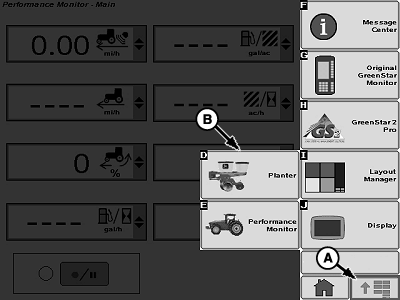
A - Menu Button
B - Planter Button
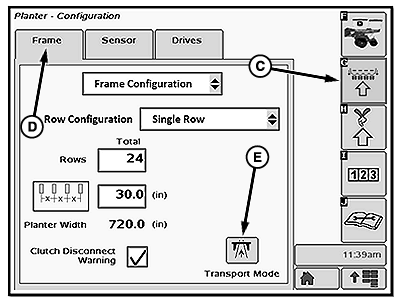
C - Configure Softkey
D - Frame Tab
E - Transport Mode Softkey
Transport Mode puts the planter controller in quiet mode. There are no warnings from planter and no functionality from planter until Transport Mode is disabled.To enable Transport Mode:
Select Menu >> Planter button >> Configure softkey >> Frame tab
Select Transport Mode softkey (E).
To disable Transport Mode, select the Transport Mode softkey on screen, monitor then returns to run page.
Screen Area Information
Planter Configuration - Planter Configuration
Frame - Frame
Sensor - Sensor
Drives - Drives
Frame Configuration - Frame Configuration
Row Configuration - Row Configuration
Single Row - Single Row
Rows - Rows
Total - Total
Planter Width - Planter Width
Clutch Disconnect Warning - Clutch Disconnect Warning
Transport Mode - Transport Mode
|
OUO6064,00005F7-19-20111110 |