Machines with RowCommand™
A67788-UN-30JUN10
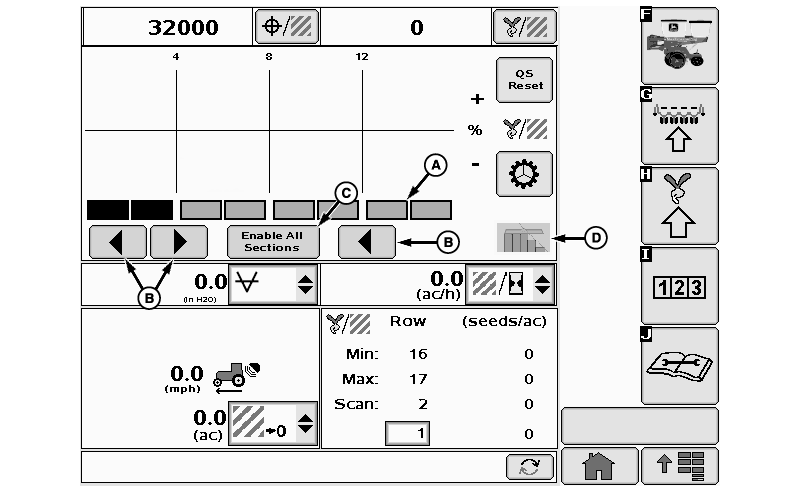
A - Drive Indicator
B - Command Buttons
C - All On Button
D - Section Control Icon (If Equipped)
Indicators (A) show activity of individual RowCommand™ sections.Select buttons (B) to turn sections on and off manually, starting from the outside of the planter. Select button (C) to enable all sections. Section control icon (D) indicates sections controlled by John Deere Section Control™.
NOTE: If numerous RowCommand™ clutches are simultaneously energized (meters disengaged), a tractor "Low Voltage" warning can occur due to limited alternator output. Reduce electrical load or increase engine RPM.
|
RowCommand™ Indicators (A) |
|
|---|---|
|
Indicator Color |
RowCommand™ Activity |
|
Green |
Section is active and detected by system. (Meter engaged) |
|
Black |
Section deactivated manually by operator using arrows or half-width disconnect switch. |
|
Neutral With Black Border |
Section deactivated by John Deere Section Control™ prescription. |
|
Not Visible |
Section is not responsive. Row continues to plant, but section cannot be controlled with RowCommand™. A warning alerts operator to failure. |
|
OUO6064,000064F-19-20111110 |