Calibrate Hydraulic Drive Motor Valve
NOTE: Perform Bleed Procedure before Calibration Procedure after any system repairs.
Calibrating VRD motors is required after repairs are made to any hydraulic drive motor or valve.
-
Start tractor. Run engine at slow idle and run air cart fan until hydraulic oil reaches minimum temperature of 21 °C (70 °F).
-
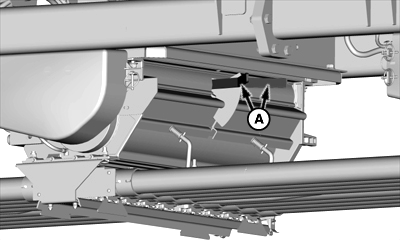
A74367-UN-20FEB12A - Half-Width Disconnect Handles
Meters That Are Being Calibrated: Push both half-width disconnect handles (A) up to stop product flow. -
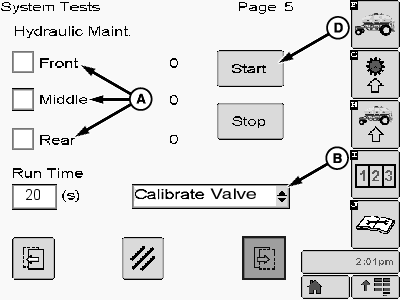
Access Hydraulic Maintenance by using Quick Select Button J to navigate to Diagnostics and Test screen.
-
NOTE: Choose one meter at a time during procedure.
A73557-UN-15NOV11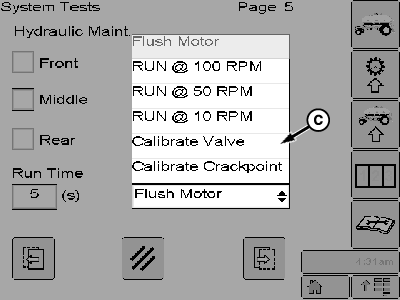
A74520-UN-15FEB12A - Motor Selection
B - Drop-down List
C - Motor Speed Selection, Calibrate Valve
D - Start
Select a meter check box (A) to run the motor for calibrating that valve. (Choose one meter at a time in running procedure.) -
Select drop-down (B) and set to calibrate valve (C).
-
Select Start button (D).
-
Motor runs at calibration speed.
-
If motor speed readout on monitor is not 115—125 rpm, calibration is needed.
-
IMPORTANT: A 2 mm hex screw is located inside the valve (B). Do not loosen or use smaller screw during calibration procedure.
NOTE: Use a person to view and report on the monitor display readings and a person at the meter to make the actual adjustment.
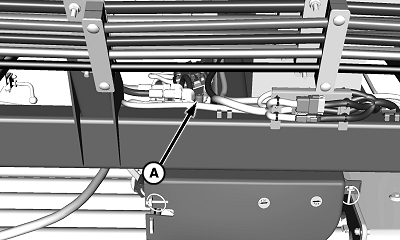
A71187-UN-07APR11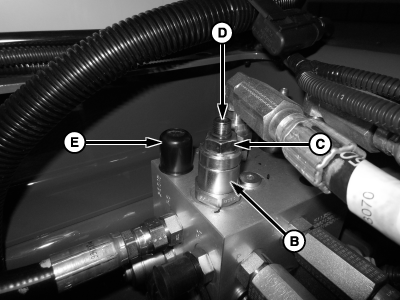
A77847-UN-10MAY13A - Valve Block
B - Adjustment Valve
C - Jam Nut
D - Adjustment Screw, 6 mm
E - Dust Cap
Locate valve block (A) and valve (B) for selected meter. -
Remove dust cap (E).
-
Loosen jam nut (C) on valve.
-
NOTE: To increase motor speed, turn adjustment screw clockwise.
Using a 6 mm hex key wrench, turn adjustment screw (D) until motor speed is 115—125 rpm on display.
-
Tighten jam nut and verify that speed is still 115—125 rpm.
-
Reinstall dust cap (E).
-
Repeat for each motor as needed.
|
LD45720,0000511-19-20130510 |