Calibrate Crackpoint
 CAUTION:
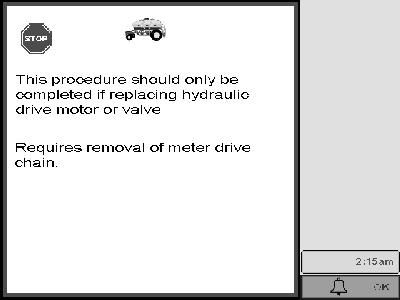
A73853-UN-13DEC11
Warning Screen
This procedure is only done if an air cart main controller, hydraulic motor or valve are replaced.NOTE: Crackpoint is the point that the hydraulic motor starts to turn.
-
Shut off tractor.
-
Connect motor hydraulic circuit to Power Beyond. Verify that Load sense is connected.
-
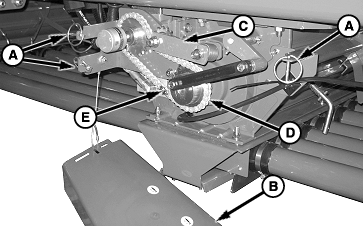
A73854-UN-13DEC11A - Retainer Pin (3 used each cover)
B - Chain Cover
C - Tensioner Arm
D - Meter Drive Chain
E - Removable Link
Remove pins (A) and chain cover (B). -
Remove drive chain (D) by taking tension off arm (C) and removing link (E).
-
Start tractor.
-
Access Greenstar display: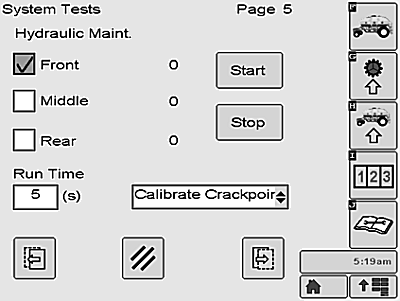
A73851-UN-13DEC11-
Select Diagnostic button, labeled J.
-
Press System test button.
-
Press F button to continue.
-
Press Next page button to access Hydraulic Maint/Diagnostic screen.
-
Select one or more meters to run during procedure; Front, Middle, or Rear.
-
Select Calibrate Crackpoint option from drop-down menu.
A74519-UN-15FEB12 -
Press Start button to begin.
-
NOTE: Hydraulic motor begins running at predetermined speed and gradually slows to a stop.
Drop down menu is disabled until motor stops running.
-
-
Proceed to Message Center (Menu/Message Center)
-
Select Diagnostic address screen.
-
Select AC2 controller from drop-down menu.
-
Advance to addresses 54, 57, and 60.
Meter Address
Three Tank Carts
Two Tank Carts
54
Front Meter
Front Meter
57
Middle Meter
N/A
60
Rear Meter
Rear Meter
-
Read and record captured values.
-
-
NOTE: No values are stored for motors that do not stop completely.
Verify that current values are between 200 ma and 400 ma. If so, procedure is complete. Proceed to Step 10.
-
If value is not within specification:
-
Perform Flush Motor procedure again.
-
Repeat Calibrate Crackpoint procedure. If value is still not in specification:
-
Repeat Calibrate Hydraulic Drive Motor Valve procedure.
-
Repeat Calibrate Crackpoint procedure. If value is still not in specification:
-
Verify that valve cartridge spools move freely or replace valve cartridges.
IMPORTANT: A Diagnostic Trouble Code is registered for any motor that fails to calibrate.
Drive Failure - Unable to reach speed (<1 rpm)
- Front meter = 523394.2
- Middle meter = 523393.2
- Rear meter = 523346.2
-
-
Shut off tractor.
-
Replace drive chain and shield on meter.
|
LD45720,00005B4-19-20130514 |