Remove Meter Cartridge Assembly (with SectionCommand™)
-
NOTE: When the cart comes to a stop the gate actuators will retract and allow the cartridge to be removed.
A82729-UN-05JUN14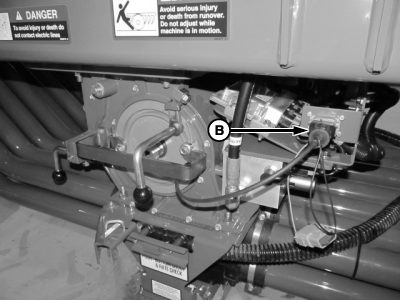
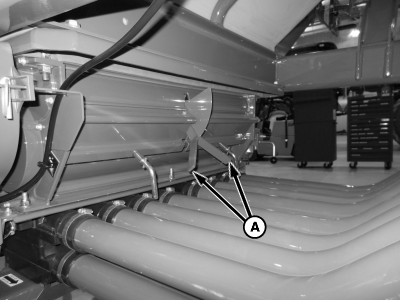
A77780-UN-01MAY13A - Half-Width Disconnect Handles
B - Gate Detection Sensor
Disengage fan and push both half-width disconnect handles (A) up to block product passages to meter. Should disconnect handles feel jammed or locked-up and not operate smoothly, they can usually be “worked” free using short up-and-down strokes at the start. Working the handles loosens caked-on residue that prevents smooth operation. -
Disconnect gate sensor harness.
-
NOTE: Air carts with 3 m (9 ft. 10 in.) tire spacing. Rotate lock handle to clear tire.
A75223A-UN-08MAY12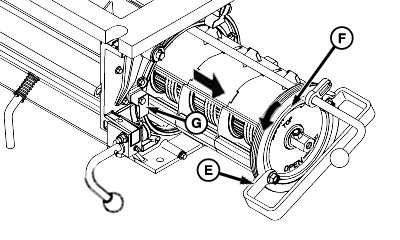
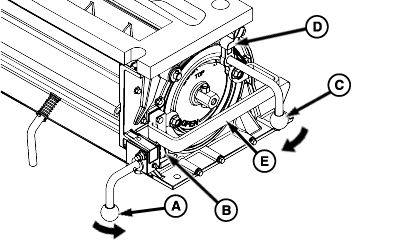
A75224-UN-08MAY12A - Cam Lock Handle
B - Cam
C - Lock Handle
D - Lock Plate
E - Cartridge Handle
F - Cartridge
G - Lock Plate
Release lock handle (C) from lock plate (D) by turning handle clockwise. -
Rotate cam lock handle (A) up. To disengage cam (B) from cartridge handle (E), pull handle toward front of machine.
-
Turn cartridge (F) counterclockwise to release handle (E) from lock plate (G).
-
Pull meter assembly from housing.
|
LD45720,00005C2-19-20140605 |