Run Screens
-
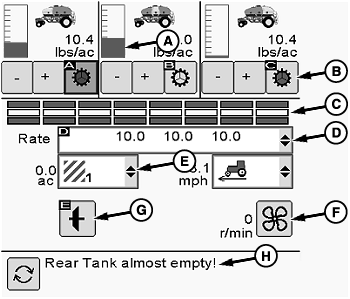
A70388-UN-09SEP11Main Run Screen
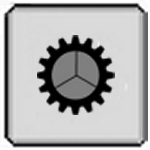
A61930-UN-22JAN08Individual Meter On

A61932-UN-22JAN08Main Drive On

A61931-UN-22JAN08Individual Meter Off

A61933-UN-22JAN08Main Drive Off
A - Tank Level Indicators
B - Individual Meter Buttons
C - Sectional Command Status
D - Variable Rate Selection
E - Area Displays
F - Fan Speed Button
G - Main Drive Button
H - Message Area
Select primary Menu button >> Air Cart button >> Main softkey.Front, middle, and rear tank rates and tank levels are displayed across top of screen.
There are three tank level sensors inside each tank. The level indicators (A) show full, half full, and empty positions according to sensor input. All indicators shown between these three areas are estimated.
-
IMPORTANT: Avoid product overload in meter cartridge and sheared drive pins. Engage meters only when fan is running.
Select individual meter buttons (B) to control each meter.
- Green—Meter is engaged.
- Clear—Meter is disengaged.
- Black—Meter is disengaged by section control or prescription.
-
To enable or disable individual sections, select Main softkey again to display SectionCommand run screen.
-
SectionCommand status (C) displays the current status of each section per tank.
-
Variable Rate Only: Select variable rate drop down box (D) to choose a programmed rate.
Use + plus and - minus buttons next to individual meter buttons to adjust variable rates. Rate increments are set during meter configuration. Rate changes on the run screen are also updated on variable rate setup screen.
-
Select drop down boxes (E) to choose area counters, area until empty, area per hour, or ground speed.
-
Select fan speed button (F) to change target speed.
-
Select main drive button (G) to enable/disable all meters. If tool is equipped with an implement switch or height sensor, main drive turns on and off as tool is raised and lowered. Use this button to override switch on tool.
-
Observe message area (H) for alerts. Select toggle button to see multiple messages.
Air Cart - Air Cart
Main - Main
Rate - Variable Rate
ac - Acre
ha - Hector
mph - Miles Per Hour
ha/h - Hectors Per Hour
lbs/ac - Pounds Per Acre
r/min - Revolutions Per Minute
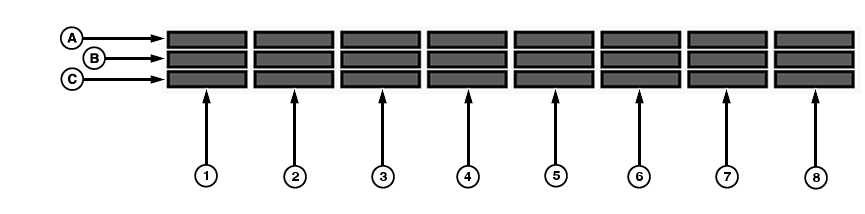
A82833-UN-18JUN14
SectionCommand™ Run Screen
A - Front Tank
B - Middle Tank
C - Rear Tank
1-8 - Meter Sections
SectionCommand™ Run Screen Explanation:NOTE: SectionCommand™ Run Screen will not display unless SectionCommand box is checked under Air Cart Configuration.
Use the image to determine air cart tanks, and sections on monitor interface.
Air cart tanks are shown with the front tank (A) at the top and the rear tank (C) at the bottom. Meter sections are shown left to right with section (1) on the left and (8) on the right.
-
NOTE: The following run screen is for carts equipped with SectionCommand™.
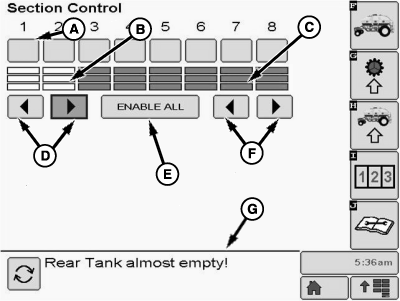
A75209-UN-04MAY12Section Command Run Screen
A - Choose Individual Sections
B - Section Status, Shown Closed
C - Section Status, Shown Open
D - Enable Sections, Left to Right
E - Enable All Sections
F - Enable Sections, Right to Left
G - Message Area
Use individual buttons (A), Left to Right button (D), or Right to Left button (F) to enable sections needed. -
Use Enable All button (E) to enable all sections.
-
Section status is shown as Closed (B) or Open (C).
-
Messages appear in lower screen section (G).
|
SectionCommand is a trademark of Deere & Company |
LD45720,0000632-19-20140625 |