Adjust Cartridge Lock (with SectionCommand™)
-
A75225-UN-08MAY12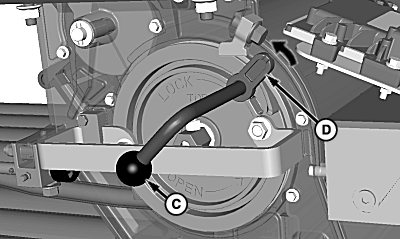
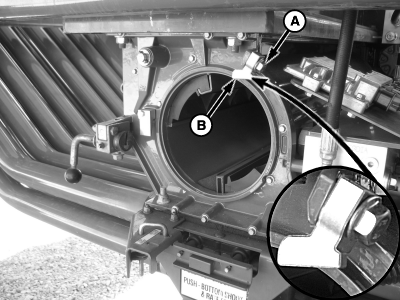
A75236-UN-09MAY12A - Cap Screw
B - Lock Plate
C - Handle
D - Tab
Loosen cap screw (A). -
Install meter cartridge into housing.
-
Engage primary lock handle to keep cartridge secure.
-
Rotate handle (C) to engage tab (D) with lock plate (B).
-
IMPORTANT: Over tight adjustment results in lock tab sticking in locked position. Under tight adjustment results in cartridge loosening during operation.
Adjust plate until tab fits under plate and snaps into place.
-
Tighten cap screw. Verify that plate did not move while tightening.
|
LD45720,0000634-19-20130501 |