Blockage Warning Setup

A72136-UN-23AUG11
Primary Menu Button
A62045-UN-14FEB08
Blockage Button
A77848-UN-10MAY13
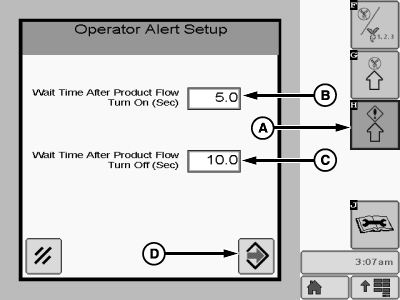
Operator Alert Setup Page
A - Operator Alert Setup Button
B - Wait Time After Product Flow Turn On Input Box
C - Wait Time After Product Flow Turn Off Input Box
D - Enter Button
The Blockage Operator Alert Setup allows the operator to set the amount of time, after product flow start and stop before the display warns the operator of a blockage. This allows for product to reach optimum flow prior to warning the operator of a blockage.-
Select primary Menu button >> Blockage button>> Operator Alert Setup (A) button.
NOTE: Select a level of sensor response. This level sets the amount of time allowed between seed detections before blockage, or undesired seed flow is indicated. Once seed rate is verified in the field, set the level as sensitive as possible without triggering nuisance alerts.
-
Enter time in seconds in the input box, wait time after product flow turn on (B). The time entered here will represent how many seconds without product flow before the display warns the operator of a potential blockage.
-
Enter time in seconds in the input box, wait time after product flow turn off (C). The time entered here will represent how many seconds the display will wait to warn that there is still product flow.
-
Select the Enter (D) button to save configuration.
|
MH69740,0000438-19-20140611 |