Configure Seeding Tool
-
A62045-UN-14FEB08Blockage Button
A62047-UN-14FEB08Blockage Configuration
A62049-UN-14FEB08Wizard Button
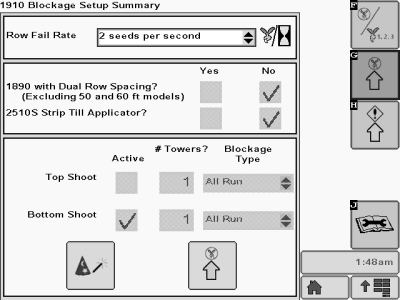
A82758-UN-12JUN14Blockage Configuration Page
Select primary Menu button >> Blockage button >> Blockage Configuration softkey. -
Select Row Fail Rate drop-down box.
NOTE: When seed flow drops below the selected level, the system will communicate a blocked condition. When seed flow exceeds the selected level at sections turned off by SectionCommand™, the system will communicate undesired seed flow in the form of a full page message or, when blockage run page displayed, the respective sensor icon will become green.
-
Select a level of sensor response. This level sets the amount of seed flow (seeds per second) before blockage, or undesired seed flow is indicated. Once seed rate is verified in the field, set the level as sensitive as possible without triggering nuisance alerts.
Row Fail Rate
When meter sections are commanded ON.
When meter sections are commanded OFF.
If product flow is below selected level, blockage is indicated. (Blockage warning, or blockage run screen indicator will change to Red.)
If product flow is above selected level, undesired seed flow is indicated. (Undesired seed flow warning, or blockage run screen indicator will change to Green.)
-
NOTE: The blockage system ships from the factory already configured. If the system needs to be configured, follow the following steps.
Select the Wizard button.
-
Place check mark next to 1890 with Dual Row Spacing (Excluding 50 and 60 ft models) if appropriate.
-
Place check mark next to 2510S Strip Till Applicator if appropriate
-
If the towers connected to the top shoot have blockage sensors, place a check in the Top Shoot Active box. Enter the quantity of towers connected to the top shoot in the input box under Towers. Select Blockage Type — Primary Only or All Run — from drop down box.
-
If the towers connected to the bottom shoot have blockage sensors, place a check in the Bottom Shoot Active box. Enter the quantity of towers connected to the bottom shoot in the input box under Towers. Select Blockage Type — Primary Only or All Run — from drop down box.
-
A62279-UN-19MAR08Previous Page
A62277-UN-23JUL08Next Page
A62295-UN-24MAR08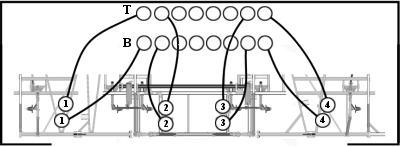
A62297-UN-24MAR08Double Shoot
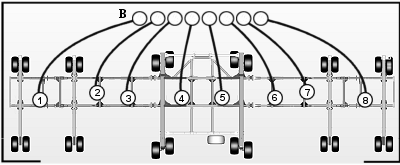
A67526-UN-27MAY1050 ft. and 60 ft. 1890 Only
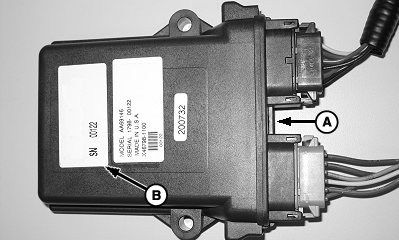
A - Module
B - Label
Select Next Page button. -
If all run blockage system, select Serial Number drop-down box next to each tower label and enter serial number of module. Module (A) serial number located on label (B).
-
Enter the number of sensors on each tower in input box.
-
Select Next Page button.
-
If primary only blockage system, enter sensor number associated with each tower. If top shoot blockage exists, enter T1 as 1, T2 as 2 and so on. Then continue number sequence with B1, B2 and so on.
-
If primary only blockage system, enter sensor number associated with each tower. If bottom shoot blockage exists, enter B1 as 1, B2 as 2 and so on.
-
Select Next Page button, them press the Accept button to confirm the new configuration.
Screen Area Information
1910 Blockage Setup - 1910 Blockage Setup
Row Fail Rate - Row Fail Rate
Seeds per second - Seeds per second
Seed every __ seconds - Seed every __ seconds
1890 with Dual Row Spacing? (Excluding 50 and 60 ft models) -
1890 with Dual Row Spacing? (Excluding 50 and 60 foot models)
Yes - Yes
No - No
2510S Strip Till Applicator - 2510S Strip Till Applicator
Top Shoot - Top Shoot
Bottom Shoot - Bottom Shoot
Active - Active
# Towers - Number of Towers
Blockage Type - Blockage Type
Primary Only - Primary Only
All Run - All Run
Blockage Setup - Blockage Setup
Primary Only—Top Shoot - Primary Only—Top
Shoot
Tower - Tower
Sensor # - Sensor Number
T1 - Top Shoot Tower Number 1
Blockage Setup - Blockage Setup
All Run—Bottom Shoot - All Run—Bottom Shoot
Active - Active
Serial # - Serial Number
Tower - Tower
# of Sensors - Number of Sensors
B1 - Bottom Shoot Tower Number 1
|
SectionCommand is a trademark of Deere & Company |
MH69740,0000446-19-20140612 |