Flow Calculator
-
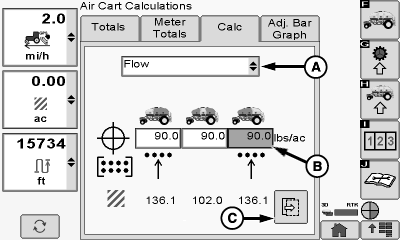
A82838-UN-19JUN14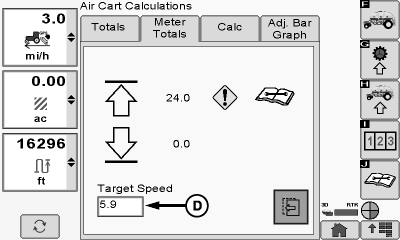
A82839-UN-19JUN14A - Drop-Down Menu
B - lbs/ac Input Box
C - Next Button
D - Target Speed Input Box
From the air cart main run screen, select the Totals softkey >> Calc tab. -
Select flow from drop-down menu (A).
-
Enter the desired rate using the lbs/ac input boxes (B) and press the next button (C).
-
Enter the desired speed using the target speed input box (D).
-
IMPORTANT: A warning is displayed if a blockage in the air system may occur for the requested lbs/ac, product and ground speed. A caution sign indicates “possibility of malfunction”, a stop sign indicates “a high possibility of malfunction”.
NOTE: Calculated flow rate is in lbs/min/primary. The top number represents top shoot, and the bottom number represents bottom shoot.
Calculated flow rate will display for top and bottom primary.
|
MH69740,000062E-19-20140619 |