Adjust Conveyor Belt Tension and Tracking
-
NOTE: If conveyor belt has stalled or slipped, additional tensioning may be necessary.
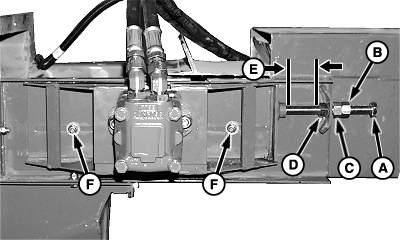
A51999-UN-10MAR03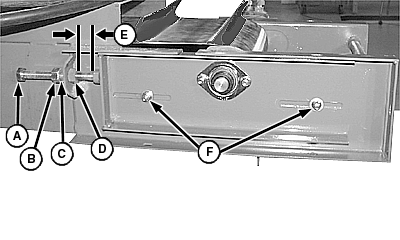
A52000-UN-10MAR03A - Adjusting Bolt
B - Jam Nut
C - Locking Nut
D - Adjusting Nut
E - Distance
F - Lock Nut (4 used)
Adjust belt tension as follows:-
Remove slack from belt by pulling both slide plates by hand.
-
Tighten adjusting bolts (A) until they touch the slide plates.
-
Tension belt forward an additional 75 mm. This will make distance (E) approximately 110 mm with most belts.
-
Tighten locking nut (C) and jam nut (B).
-
-
NOTE: It is normal for belt to track side-to-side approximately 2 mm in either direction.
Check belt for proper tracking as follows:
-
Rotate belt by hand approximately 3 m (10 ft). If belt tracks towards one side and will not return to center, adjustment is necessary.
-
If adjustment is required, tighten adjusting bolt (A) one flat (1/6th turn) at a time, on the side where belt is rubbing; then rotate by hand again to see if tracking returns to center.
-
Run conveyor at slowest speed and observe tracking. If additional adjustment is necessary, continue to tighten adjusting bolt in small increments until belt tracks side-to-side approximately 2 mm in either direction without contact to housing.
-
Repeat as necessary until belt is centered.
-
Tighten lock nuts (F).
-
|
OUO6037,00016C8-19-20060418 |