Configure Variable Rates
-
A59671-UN-14JAN08Air Cart Button

A59847-UN-25JAN08Meters Softkey
A59862-UN-22JAN08Cart Tank

A59864-UN-31MAR07Apex
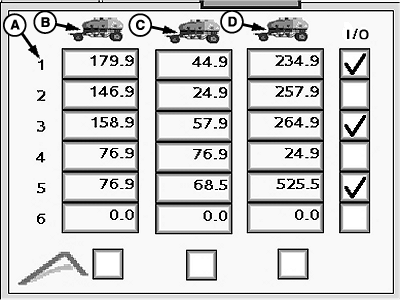
A59865-UN-12NOV12A - Six Rate Combinations
B - Front Tank
C - Middle Tank
D - Rear Tank
Select primary Menu button >> Air Cart button >> Meters softkey >> Variable Rate tab. -
NOTE: Only two tanks appear for smaller carts.
Configure up to six rate combinations. Select the input boxes for the front, middle, and rear tanks and enter rate values.
-
To make a rate combination available on the Main RUN screen, select the check box next to a row.
-
To set a tank to operate from the Apex™ software, select the check box under a tank column.
Screen Area Information
Air Cart - Air Cart
Meters - Meters
Variable Rate - Variable Rate
|
OUO6074,0000FDD-19-20140604 |