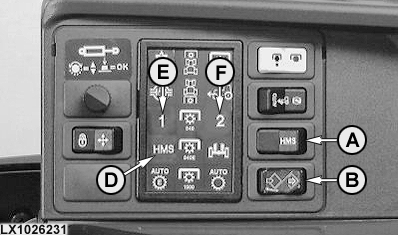
Headland Management System HMS II - DetailsBasic controlsOn/off switch (A): When this switch is actuated, an acoustic signal is emitted.
Record/save switch (B): When this switch is actuated, an acoustic signal is emitted.
|
|


OULXE59,001069C -19-28SEP04-1/8 |
|
Program switch (C):
Functions that can be recorded Differential lock: The "on"/"off" status is recorded. Front-wheel drive: The status "brake assist (off)", "on" and "auto" is recorded. NOTE: If HMS II is to perform a program that includes a front-wheel drive function, the FWD switch must be either in the "on" position or the "Auto" position. If HMS II switches FWD off, the FWD indicator light will flash "slowly" (on briefly, off for longer) until HMS II switches FWD on again or until the FWD switch is moved to its "off" position. In the event of HMS II being switched off during the period of slow flashing, the FWD indicator light changes to "rapid" flashing (on/off for the same length of time) until the FWD switch is moved to its "off" position. Rear PTO: The "on"/"off" status is recorded. |
|
OULXE59,001069C -19-28SEP04-2/8 |
|
NOTE: If HMS II is to perform a program that includes a PTO function, the PTO switch must be in its "on" position. If HMS II switches the PTO off, the PTO indicator light will flash "slowly" (on briefly, off for longer) until HMS II switches PTO on again or until the PTO switch is moved to its "off" position. In the event of HMS II being switched off during the period of slow flashing, the PTO indicator light changes to "rapid" flashing (on/off for the same length of time) until the PTO switch is moved to its "off" position. Front PTO: The "on"/"off" status is recorded. NOTE: If HMS II is to perform a program that includes a PTO function, the PTO switch must be in its "on" position. If HMS II switches the PTO off, the PTO indicator light will flash "slowly" (on briefly, off for longer) until HMS II switches PTO on again or until the PTO switch is moved to its "off" position. In the event of HMS II being switched off during the period of slow flashing, the PTO indicator light changes to "rapid" flashing (on/off for the same length of time) until the PTO switch is moved to its "off" position. Rockshaft: The "raise", "lower" and "quick lower" functions are recorded. NOTE: If HMS II is to perform a program that includes a rockshaft function, the rockshaft control switch must be in its neutral position. Selective control valves: The "extend", "retract", "float" and "neutral" functions are recorded (on tractors with Command Arm only). NOTE: If HMS II is to perform a program that includes an SCV function, the control lever of the relevant SCV must be in its neutral position. |
OULXE59,001069C -19-28SEP04-3/8 |
|
Recording a program
NOTE: To enable the recording of PTO or rockshaft functions, the tractor must be driven at a speed of at least 0.5 km/h (0.31 mph). Recording may be interrupted if the tractor's speed momentarily drops below 0.5 km/h (0.31 mph). If this interruption lasts more than 60 seconds, the recording will be abandoned. Functions "front PTO on", "rear PTO on" and "lower rockshaft" can be recorded only when the tractor is moving in forward direction. 1. Pressing on/off switch (A) makes HMS II indicator light (D) come on.2. Pressing record/save switch (B) makes light (D) flash and an acoustic signal is emitted every 2 seconds. 3. Set program switch (C) to "1" or "2". Program indicator light (E) or (F) flashes. 4. Perform the desired functions with the tractor. 5. When finished, press record/save switch (B) again. The sequence of functions has been recorded and is now stored as a program. The program indicator light goes out; the HMS II indicator light remains on continuously (no flashing). Stopping a recording The following actions have the effect of stopping a recording before it is completed: 1. Actuating the HMS II on/off switch.2. Not selecting a program within 60 seconds. 3. Not performing a function within 60 seconds. 4. Not actuating the record/save save switch within 60 seconds of performing the first function. |
|
OULXE59,001069C -19-28SEP04-4/8 |
|
5.
Switching on a PTO when the transmission is not in a forward gear.
6. Lowering the rockshaft when the transmission is not in a forward gear. 7. No operator on the seat and the tractor not moving for more than 5 seconds. 8. A fault being detected at the program switch. Displaying the stored programs When HMS II is selected, all the functions included in the two programs are displayed one after the other, each appearing for 2 seconds. This display will reappear if the operator leaves his seat for more than 30 seconds while HMS II is active. |
OULXE59,001069C -19-28SEP04-5/8 |
| Dot matrix display | LCD screen | Meaning |
|---|---|---|
| Text "SEQUENCE I" | SE-1 | Program 1 |
| Text "SEQUENCE II" | SE-2 | Program 2 |
| Differential lock symbol | dLon | Differential lock on |
| Differential lock symbol scored through | dLoF | Differential lock off |
| Front-wheel drive symbol | Fdon | Front-wheel drive on |
| Front-wheel drive symbol scored through | FdoF | Front-wheel drive off |
| Rear PTO symbol | Pton | Rear PTO on |
| Rear PTO symbol scored through | PtoF | Rear PTO off |
| Front PTO symbol | FPto | Front PTO on |
| Front PTO symbol scored through | FPoF | Front PTO off |
| Rockshaft symbol + "up" arrow | HUP | Rockshaft rises |
| Rockshaft symbol + "down" arrow | Hdn | Rockshaft lowers |
| Tractor symbol (rear) + SCV cylinder symbol + "up" arrow + number | EtdX | SCV X (1-4) extends |
| Tractor symbol (rear) + SCV cylinder symbol + number + "down" arrow | rEtX | SCV X (1-4) retracts |
| Tractor symbol (rear) + SCV cylinder symbol + number + ~ | FLtX | SCV X (1-4) in float |
| Tractor symbol (rear) + SCV cylinder symbol + number scored through | CAnX | SCV X (1-4) in neutral |
| SCV cylinder symbol + tractor symbol (front) + number + "up" arrow | EtdX | Front SCV X (6-8) extends |
| SCV cylinder symbol + tractor symbol (front) + number + "down" arrow | rEtX | Front SCV X (6-8) retracts |
| SCV cylinder symbol + tractor symbol (front) + number + ~ | FLtX | Front SCV X (6-8) in float |
| SCV cylinder symbol + tractor symbol (front) + number scored through | CAnX | Front SCV X (6-8) in neutral |
| End | End | Program completed |
|
Performing the stored programs NOTE: To enable the recorded programs to be performed, the tractor must be driven at a speed of at least 0.5 km/h (0.31 mph). Before programs are performed that include front-wheel drive and/or PTO functions, front-wheel drive and/or the PTO(s) must be switched on. HMS II cannot physically "turn on" the relevant switches. Before programs are performed that include rockshaft and/or SCV functions, the relevant levers/switches must be in their neutral positions. 1. Pressing on/off switch (A) makes HMS II indicator light (D) come on. |
OULXE59,001069C -19-28SEP04-6/8 |
|
2.
To select the desired program, press program switch (C) or (G) to "1" or "2". Program indicator light (E) or (F) will come on. This light goes out once the program has been completed.
Faults in the functions If a fault occurs in a function that is included in the program, then the following applies:
Manual intervention while a program is running If one of the stored functions is activated manually while the program is running, this function will be ignored for the rest of the program. The function will not be deleted from the program. The other functions are performed in their normal sequence. Stopping a program while it is still running The following actions have the effect of stopping a program while it is still running: 1. Selecting the other program at the program switch.2. Pressing the on/off switch. 3. Pressing the record/save switch. 4. It taking longer than 60 seconds for the program to be completed. 5. The requirement to switch on a PTO when the transmission is not in a forward gear. |
OULXE59,001069C -19-28SEP04-7/8 |
|
6.
The requirement to lower the rockshaft when the transmission is not in a forward gear
7. The operator leaving his seat and the tractor not moving for more than 5 seconds. 8. The rockshaft or a selective control valve not performing the desired function. 9. A fault being detected at the program switch. If a program is stopped while it is running and functions have already been performed, then HMS II reacts as follows:
Deleting the stored programs 1. Pressing the on/off switch makes the HMS II indicator light come on. 2. Pressing the record/save switch makes the HMS II light flash and an acoustic signal is emitted every 2 seconds. 3. To select the program to be deleted, set the program switch to "1" or "2". The program indicator light starts to flash. 4. Do not perform any functions with the tractor. 5. When finished, press record/save switch (B) again. The selected program is now deleted. The program indicator light goes out; the HMS II indicator light remains on continuously (no flashing). |
OULXE59,001069C -19-28SEP04-8/8 |