AutoQuad Plus Transmission - SettingsSelecting automatic gear-shiftingPress transmission button (A) and select automatic gear-shift (B). Select the forward/reverse ratioThe relationship between forward and reverse gears can be selected on the CommandCenter screen from a maximum of 3 gears higher in reverse to 3 gears lower (+3 to -3). Press transmission button (A) and select the desired relationship in cell (C). The relationship remains in effect when automatic gear shifting is switched off, and is stored after ignition is switched off. If smart is selected, the electronic system will learn the forward and reverse gear manually selected by the operator and will shift into the relevant gear when changing the direction of travel. NOTE: When automatic gear shifting is activated, a set maximum gear takes priority over the selected relationship. |
|
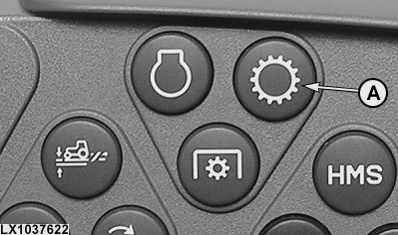
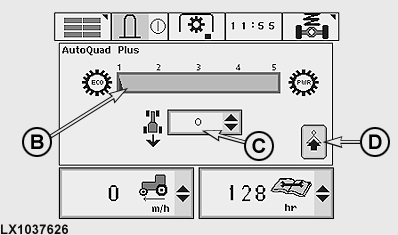
OU12401,0001970 -19-23DEC07-1/3 |
|
Speed-matching when changing ranges
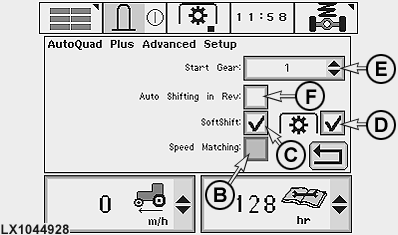
If this option is activated, when changing ranges at travel speeds at or above approx. 7 km/h (4.4 mph), the transmission is automatically shifted into a gear that matches the travel speed. This automatic function can be overridden by holding down one of the gear shift buttons. Press transmission button (A) and select speed-matching (B). Engine-speed matching when shifting gearsIf this option is activated, engine speed is altered temporarily by the electronics to achieve a smoother shift. Press transmission button (A) and select engine-speed matching (C) and - if desired - PTO operation (D). Engine speed can then be matched in the following ways:
The figure in cell (E) determines which gear will be automatically selected at the transmission immediately after the engine is started. Automatic gear-shifting in reverseIn cell (F), you can select whether or not automatic gear-shifting is active in reverse as well. |
|
OU12401,0001970 -19-23DEC07-2/3 |
|
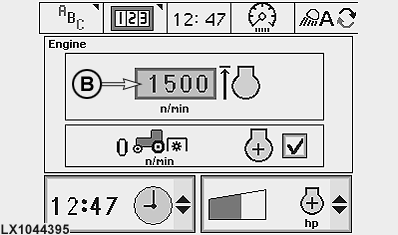
Setting an upper limit for engine speed
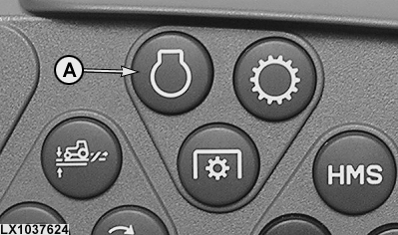
This option allows you to set an upper limit for engine speed when performing certain work such as operating an hydraulic motor. Run the engine, set the hand throttle to maximum speed, then press engine button (A) and set the desired engine speed in cell (B). In the lowest setting, engine speed is limited to 1050 rpm. In the highest setting, the engine can run at maximum speed. Individual engine speed limits can be set between these two positions.
|
|
OU12401,0001970 -19-23DEC07-3/3 |