Changing the ClimaTrak Display (ATC)
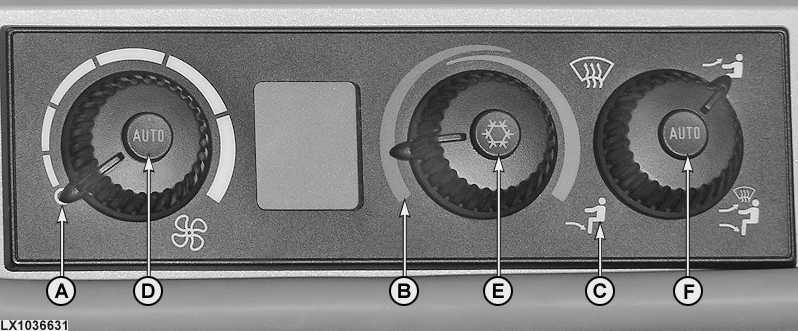
LX1036631-UN-07MAY08
A - Off
B - Max. cool position
C - Air outlet in footwell
D - Auto fan button
E - Economy button
F - Auto air-flow button
How to change the temperature display from °C to °F and back
NOTE: To change the temperature units as described on this page, the CommandCenter has to be set to customary units. See ”CommandCenter settings” in the ”Controls and Instruments” section.
- Turn fan speed control to off (A).
- Turn temperature control to max. cool position (B).
- Turn mode control to foot (heat) position (C).
- Then press button (D) and button (E) at the same time.
The letters DIA appear on the LCD after the ”change” mode has been accessed.
The units of measurement in which temperature is displayed (°C or °F) are changed by pressing switches (D) and (F) at the same time.
Then leave the ”change” mode by pressing button (D) and button (E) at the same time.
|
OU12401,00012B3-19-20050825 |