Using ClimaTrak (Automatic Temperature Control)
LX1036233-UN-08AUG06
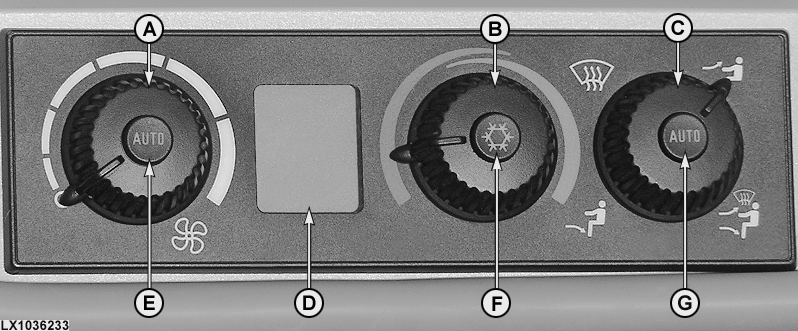
A - Fan speed control
B - Temperature selection knob
C - Air-flow control
D - LCD temperature display
E - AUTO fan control mode
F - Economy mode ON/OFF switch
G - AUTO air-flow mode
System controls and display
There are three controls and an LCD window on the ClimaTrak (ATC) console.
- Fan speed control (A) with AUTO switch (E)
- Temperature control (B) with economy mode switch (F)
-
Four-position air-flow control (C) with AUTO switch (G)
- Defog/windshield
- Defog/dashboard/footwell
- Dashboard
- Footwell
Outside temperature is displayed on the LCD display (D). Desired temperature is displayed for 10 seconds every time the engine is started and every time the setting is changed at the temperature control switch.
NOTE: If you want desired temperature to be displayed all the time, change the setting at address ATC033. See ”Customization” in the ”Diagnostic Trouble Codes and Customization” section.
When in automatic fan mode, a fan symbol and the word AUTO are displayed. When the air-conditioning clutch is engaged (not in economy mode), the snowflake symbol is displayed. Direction of air-flow is displayed by an arrow pointing towards the feet or head, and the defog symbol appears. The word ”AUTO” appears below the man when the system is in automatic air-flow mode.
In AUTO air-flow mode, selection is infinitely variable between defog, footwell and footwell/dashboard.
- Dashboard — Air is directed to the louvers in the dashboard.
- Footwell — Air is directed to the footwell, unless defogging is required.
- Defog — Air is directed to the windshield.
- Defog/dashboard/footwell — Variable settings to direct air-flow as needed.
NOTE: To ensure that ClimaTrak gives its best performance, clean the recirculated-air filters in the cab regularly (see ”Service - As Required”).
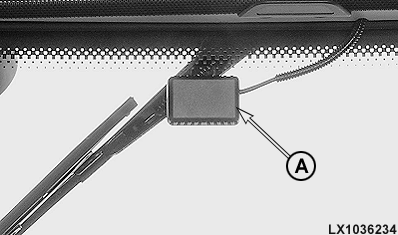
Defog sensor
LX1036234-UN-03JUN05
IMPORTANT: Do not expose defog sensor (A) to large quantities of water.
|
OU12401,000144D-19-20060612 |