Operating the IVT
Reverser lever
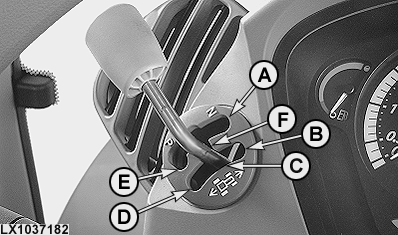
LX1037182-UN-06JUN06
A - Neutral
B - Forward
C - ”Power Zero”
D - Reverse
E - Corner park
F - Center park
To drive the tractor, move the lever to forward (B) or reverse (D). If the lever is moved from forward or reverse back to center park (F), the tractor will continue to roll and the transmission goes to ”Power Zero”. Ten seconds after the tractor stops rolling, park will automatically engage. If the lever is moved from forward or reverse directly to the corner park position (E), the tractor will brake to a stop using the transmission. Park will then engage. Remember to actuate the brake pedals as well when driving downhill.If the lever is moved from forward or reverse to "Power Zero" (C), the tractor will continue to roll but it will not be braked by the transmission. When the tractor is stationary, power remains at the transmission. For ”Power Zero”, the lever must be held firmly in this position. If the lever is released from the ”Power Zero” position, it will automatically go to the center park position (F).
When the tractor is stopped, move the lever back to the corner park position. If the lever is moved to neutral (A), the direction clutches are opened and there will be no power in the transmission. The tractor may roll away.
Speed control lever
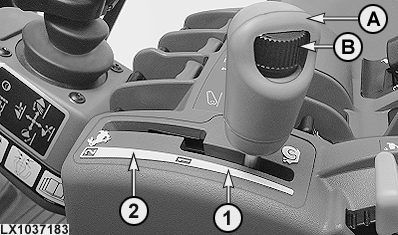
LX1037183-UN-10OCT05
A - Speed control lever
B - Speed wheel (for setting maximum speed)
1 - Speed range 1
2 - Speed range 2
Travel speed is regulated using the speed control lever. Two speed ranges are available.
Speed range 1 allows a maximum forward speed of 20 km/h (12.4 mph). Speed range 2 allows a maximum forward speed of 40 km/h (25 mph). The maximum speed in range 1 is always the minimum speed in range 2. This implies that speed does not change when the range is changed.
The maximum speed in a speed range is adjusted using speed wheel (B). See ”IVT Settings” on the following pages for details.
The maximum speed of a range is reached with the engine at full throttle and the speed control lever at the end of its travel in the speed range (provided tire dimension match the set values precisely). If the accelerator pedal is not at the end of its travel, the tractor will move at a corresponding speed (not proportional). If the speed control lever is not at the end of its travel in a speed range, the tractor will similarly operate at a corresponding speed.
Speed wheel (B) does not have a stop and can be ”infinitely” adjusted. It makes a change in relation to the previous setting. If the maximum speed setting is changed with wheel (B) while the tractor is moving, the change is always based on the last setting. Turning the wheel will directly increase or decrease the last maximum speed setting. Any changes are stored by the tractor's electronics.
Creeper
If a forward travel speed below 2 km/h (1.24 mph) is used in speed range 1, the tractor will automatically shift to creeper mode. The possible minimum travel speed is 0.05 km/h (0.03 mph).
The highest speed in range 2 is 2.5 times that in range 1. In both speed ranges, the highest speed in creeper mode is never more than 2.5 times greater than the lowest speed. For example, if a maximum speed of 0.50 km/h (0.33 mph) is set in range 1, the minimum speed is 0.20 km/h (0.12 mph).
At speeds below 0.6 km/h (0.37 mph), changing engine speed does not have any effect on travel speed.
The following occurs if the speed-adjusting wheel is used to increase travel speed while the tractor is in motion in range 2 with creeper mode selected:
- If the speed selected is below 10 km/h (6.2 mph), the transmission remains in creeper mode. This means the originally set values will apply on changing back to range 1. Speed range 1 will flash on the digital display.
- Creeper mode also remains in effect if the 10 km/h (6.2 mph) speed is temporarily exceeded and then reduced to under 10 km/h (6.2 mph) before returning to range 1.
- Creeper mode will be exited if the 10 km/h (6.2 mph) speed is exceeded and range 1 is re-engaged. Forward speed range 1 will be automatically adjusted (to 2 km/h; 1.24 mph).
Accelerator pedal and hand throttle
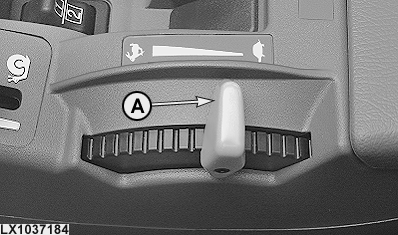
LX1037184-UN-10OCT05
A - Hand throttle
The stronger signal is always used for transmission control.
If the accelerator pedal or hand throttle are moved to command a higher engine speed, engine speed increases. In Eco mode, once the set travel speed is reached, engine speed is reduced (load controlled).
If the reverser lever is in forward or reverse, the tractor can be accelerated to the set speed using the accelerator pedal or hand throttle. The immediate travel speed is directly dependent on the setting of the accelerator pedal or hand throttle. Engine speed is indirectly determined by the position of the accelerator pedal.
When the accelerator pedal or hand throttle are actuated, the values set in the CommandCenter for automatic control and engine-speed limitation are always taken into account. For example, the value set for engine-speed limitation is not exceeded, even at full throttle. In Eco mode, the engine turns only as fast as needed, even if the operator applies full throttle.
Brake pedals
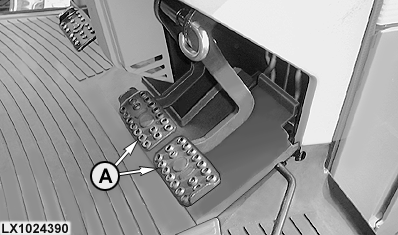
LX1024390-UN-03JUL00
A - Brake pedals
If when driving the tractor both brake pedals are depressed, the tractor's speed will be reduced until it stops. Thanks to the automatic clutch function, there is no need to depress the clutch pedal when braking.
When the brakes are released again, the tractor automatically accelerates up to the speed currently commanded by the hand throttle or accelerator pedal.
The higher the engine speed, the greater is the force required at the brake pedals to stop the tractor.
Clutch pedal
The clutch pedal normally does not need to be depressed to stop the tractor. If the clutch pedal is depressed, the corresponding clutch signal has priority over other commands.
|
OU12401,000145D-19-20060614 |