HMS, Programming with Tractor Stationary (Edit Mode)
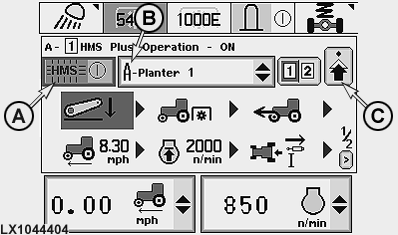
LX1044404-UN-29NOV07
HMS main page
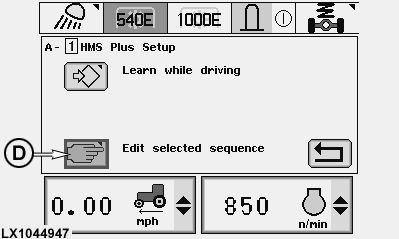
LX1044947-UN-19DEC07
HMS select page (edit/learn mode)
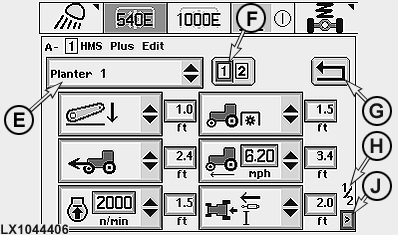
LX1044406-UN-29NOV07
HMS Edit - page 1
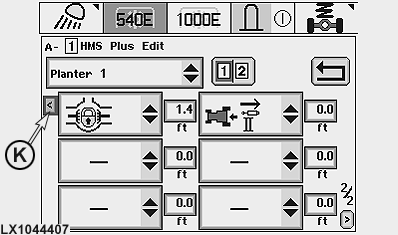
LX1044407-UN-29NOV07
HMS Edit - page 2
A - HMS on/off
B - Memory (A-E)
C - “Next page” symbol
D - Edit mode
E - Implement application
F - Program select cell
G - “Back to HMS main page” symbol
H - Page indicator
J - “Next function page” symbol
K - “Previous function page” symbol
On the screen, switch on HMS by actuating cell (A) (the HMS indicator light lights up on the dashboard). In cell (B), select the desired implement memory (A-E). A suitable implement name can be selected later via cell (E). The HMS select page (edit/learn mode) is displayed after pressing symbol (C). On this page the edit mode can be accessed via symbol (D). From list (E), choose the desired implement and then the desired program (1 or 2) using the program switch or cell (F). Select the desired functions from the selection lists and use the selection wheel to determine the distances between the functions. Use cell (G) to save the program and to display the HMS main page. For details regarding the programming process, see next page.
NOTE: To delete a single function from a program, select the empty cell from the selection list.
To overwrite a single function, choose the new function from the selection list.
To add a function, go to the desired position and select the add cell from the drop-down list. The other functions (including the one already selected) move down one position.
The following applies to the rear PTO function:
PTO is switched off once the three-point hitch has reached
25% of the lift height. PTO is switched on AFTER the tractor has moved the set distance. If the PTO is switched on
too early or too late, change the set distance to achieve optimum
function timing.
|
OU12401,000196C-19-20071219 |