IVT - Settings
Ground speed
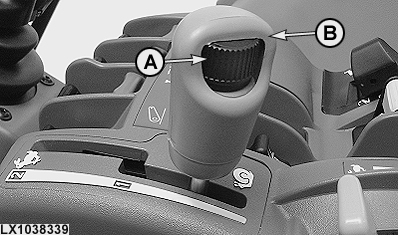
LX1038339-UN-18MAY06
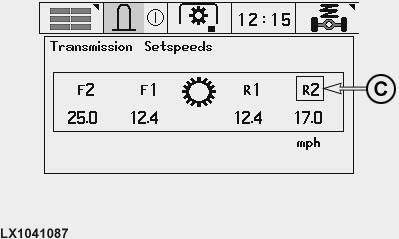
LX1041087-UN-20NOV06
A - Speed Wheel (for setting maximum speed)
B - Speed Control Lever
C - Range Mark
The maximum speed in a speed range is adjusted using speed wheel (A) and speed control lever (B).
To set a forward speed range only, switch on the ignition and move the reverser lever to forward. Use speed control lever (B) to select the desired range and set the desired travel speed with wheel (A).
To set a reverse speed range only, switch on the ignition and move the reverser lever to reverse. Use speed control lever (B) to select the desired range and set the desired travel speed with wheel (A).
To set both a forward and reverse speed range, switch on the ignition and move the reverser lever to neutral. Range (C) alternates every 2 seconds between the forward and reverse speed ranges. Use speed control lever (B) to select the desired range and set the desired travel speed with wheel (A).
Setting the transmission's automatic control
LX1037622-UN-06NOV06
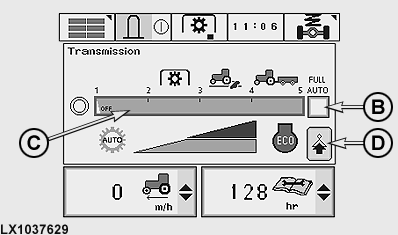
LX1037629-UN-31MAY06
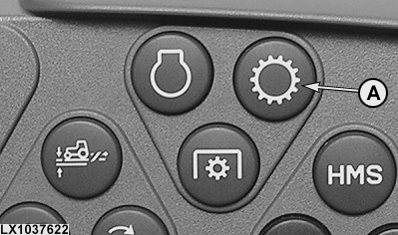
A - Transmission Button
B - Fully Automatic on/off
C - Degree of Automation
D - Next Page
Press transmission button (A). The screen shown controls the extent to which the transmission is controlled automatically.
When cell (B) is activated, fully automatic comes into force. The electronic system reacts automatically to the demands made on the engine by the PTO, hitch, electronic SCVs and steering brake. For more details, see Setting for fully automatic on the following pages.
When cell (B) is de-activated, the following applies per the setting in cell (C):
In setting 0 (manual), the only automatic intervention is to prevent the engine from stalling.
In setting 1, transmission control is minimally influenced by the electronic system. In setting 5, transmission control is most influenced by the electronic system. The extent of transmission automation progressively increases in settings 1 to 3, between 3 and 5 there is additional automation of engine control.
Engine load control is set in settings 1 to 3. In settings from greater than 3 to 5 (Eco mode), the engine turns only as fast as needed. This results in fuel savings and noise reduction. If the operator sets a specific engine speed in Eco mode and the electronic control system recognizes that this speed is not necessary, engine speed will be automatically reduced to a level adequate for tractor operation. Travel speed remains constant, however. Eco mode is not suited for lifting operations (where engine speed determines hydraulic pump output) and PTO operation (where engine speed directly determines PTO speed).
In Eco mode, you can override the set engine speed by operating the accelerator pedal and hand throttle at the same time.
|
Setting 0 — |
Manual control of transmission |
|
Setting 1 — |
Approx. 30% engine load control before transmission intervenes, i.e. the transmission ratio changes. |
|
Setting 2 — |
Approx. 18% engine load control before transmission intervenes. |
|
Setting 3 — |
Approx. 4% engine load control before transmission intervenes. |
|
Setting 4 — |
Approx. 16% engine load control* before transmission intervenes. Engine speed can be reduced electronically to a speed not lower than 1500 rpm in the partial load range. |
|
Setting 5 — |
Approx. 16% engine load control before transmission intervenes. Engine speed can be reduced electronically to a speed not lower than 1200 rpm in the partial load range. |
|
* If Intelligent Power Management (power boost) is activated (see Operating the Engine section), engine load control lies between 13% and 16%, depending on travel speed. |
|
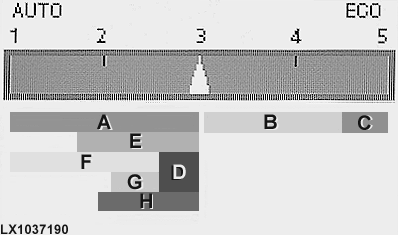
LX1037190-UN-11OCT05
|
Range A — |
PTO operation |
|
Range B — |
Towing operations with hydraulic power requirements |
|
Range C — |
Any towing operation (field or road) without any hydraulic power requirement (since hydraulic power is not sufficient at an engine speed of 1200 rpm) |
|
Range D — |
PTO operation, with precise PTO speeds (for example, when using a manure spreader) |
|
Range E — |
Operation of balers |
|
Range F — |
Tillage |
|
Range G — |
Operation of mowers |
|
Range H — |
Other operations requiring hydraulic power (e.g. use of front loaders) |
The following may be regarded as basic settings:
|
Setting 1-2 — |
Work in which the engine's flywheel mass (PTO operation) and vehicle inertia (earth-moving) are adequate to meet transient peaks in the power requirements (caused by the implement or task in hand). |
|
Setting 2.5 — |
Operations where engine speed is important. |
|
Setting 5 — |
Operations where engine speed is not important. |
|
Summary of different types of work |
||
|---|---|---|
|
Procedure |
Setting for automatic |
Comment |
|
Crop protection, liquid fertilizer |
1 |
The transmission behaves like a conventional one with stepped gears. As engine speed drops due to increased load, travel speed also drops. The simultaneous reduction in PTO speed causes the output of pesticide to drop in step with travel speed. Adjust and operate pesticide equipment in accordance with the manufacturer's guidelines and the instructions provided by the pesticide/fertilizer producer. The less the engine is subjected to load control (e.g. 5 %), the greater the danger of excessive pesticide being metered as a result of the stepless change in the transmission ratio as load increases while engine and PTO speeds remain constant. Select other settings between 1 and 3, but take into account the technical aspects of the pesticide machine (metering, electronic regulation). The user must ensure that the pesticide is metered correctly. |
|
Fertilizing (spreader for mineral-based fertilizers; manure spreader, liquid fertilizer) |
3 |
A constant width of spray can be achieved only if PTO speed remains constant. If metering is not achieved on the basis of distance travelled, preselect a travel speed that can be sustained over the entire field. If the spreader functions independently of engine speed (e.g. a hydraulically-driven spreader), a different engine load control setting may be selected, provided the user makes sure that the material being sprayed is metered and distributed correctly. |
|
Balers (large, round and high-pressure) |
2-3 |
Select travel speed and engine load control so that the engine can cope with differences in terrain and windrow, to overcome load peaks with rising engine torque and the inertia of the driveline. PTO speed must be kept high enough for the machine to work properly. The operator may vary travel speed infinitely at any time as he pleases, without changing the engine speed, and thus adapt his speed to the requirements. |
|
Mowers, mowers with conditioners, self-loading wagons |
2-3 |
Same as for balers. |
|
Turning, making and spreading windrows |
1-3 |
Select a setting appropriate to your requirements. |
|
PTO-driven tillage equipment (rotary harrow, rotary cultivator, tined rotor, also in combination with seed drills and spacing seeders) |
2-3 |
Drive in a manner appropriate to the terrain, soil conditions and desired results. To achieve the desired crumb structure, there should not be too great an imbalance between PTO speed and travel speed. |
|
Mechanical drills (metered via a wheel on the ground, with no PTO-assisted tillage) |
greater than 3-5 |
Select a setting greater than 3 for economical driving. |
|
Pneumatic drills and spacing seeders (without tillage) |
2-3 |
PTO speed must be sufficiently high for pneumatic distribution of the seeds. |
|
Transport, driving on roads, towed tillage implements (plow, seedbed combination implements etc.) |
greater than 3-5 |
Select a setting greater than 3 for economical driving. |
|
Front loaders and hydraulically driven machines (silage cutters, feed mixers etc.) |
2-4 |
Select any setting suitable for the work load (light or heavy loads on front loader). To achieve the desired machine speed, the hydraulic system must be able to provide sufficient oil. |
IMPORTANT: When applying pesticides and fertilizers, always comply with the guidelines provided by the machine manufacturer and the pesticide/fertilizer producers, and with the relevant legal requirements.
Setting the relationship of forward to reverse speed
LX1037622-UN-06NOV06
LX1037630-UN-31MAY06
A - Transmission Button
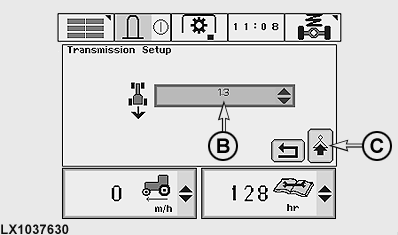
B - Forward/Reverse Relationship
C - Next Page
Press transmission button (A). At the first screen, confirm the next page cell. Then, on the following screen, the desired relationship can be set at cell (B). There are 2 variants:
-
In range 1, reverse speeds can be set to a maximum of 30% higher
(selection 1.3) and 70% lower (selection 0.3) than forward speeds.
A setting such as this only takes effect if the maximum speed in a
speed range is adjusted using the speed wheel.
In range 2 the forward-to-reverse speed ratio is 1:1 up to 22 km/h (14 mph). Above that, it changes automatically to 40:30.
- If independent is selected, any speed can be set in speed ranges 1 and 2 for each direction of travel. This does not apply to creeper mode.
Setting for fully automatic
LX1037622-UN-06NOV06
LX1041047-UN-29JUN06
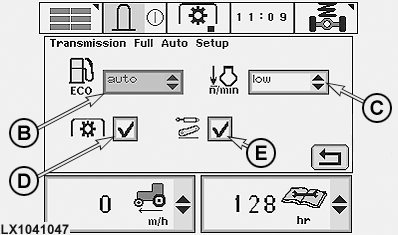
A - Transmission Button
B - ECO
C - Engine Speed (n/min)
D - PTO
E - Hitch/Selective Control Valves
Press transmission button (A) and confirm next page at each of the following two screens. Then, at the next screen, the electronic engine/transmission control can be altered to suit the operating conditions.
In cell (B), the following selections can be made:
-
Auto
16% engine load control, or 13% to 16% if Intelligent Power Management (power boost) has been activated (see Operating the Engine section).
-
low
4% engine load control
-
med
9% engine load control
-
high
14% engine load control
In cell (C), the following selections can be made:
-
low
Engine speed may fall to 1200 rpm
-
med
Engine speed may fall to 1400 rpm
-
high
Engine speed may fall to 1600 rpm
If cell (D) is activated, the automatic control changes to the 2.5 setting whenever the PTO is selected.
If cell (E) is activated, the following applies:
- If the three-point hitch is raised or lowered, the automatic control moves to setting 4 until the hitch has completed its movement.
- If an electronic SCV is operated, the automatic control moves to setting 4 for the duration of this condition.
- The automatic control does NOT move to setting 4 if an electronic SCV is moved to float position.
- If engine speed is increased at the accelerator pedal or hand throttle while an electronic SCV is operating, the automatic control moves to a setting of 2.5. If the speed is reduced using the accelerator pedal or hand throttle, the automatic control switches to a setting of 4.
If the tractor's electronics register that the steering brake is in use, the automatic control moves down one unit (from setting 5 to setting 4 or from setting 4 to setting 3).
Setting an upper limit for engine speed (Field Cruise)

LX1037624-UN-06NOV06
LX1044395-UN-06MAR08
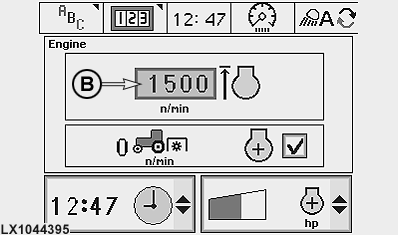
A - Engine Button
B - Upper Limit for Engine Speed
This option allows you to set an upper limit for engine speed when performing certain work such as operating an hydraulic motor.
Run the engine, set the hand throttle to maximum speed, then press engine button (A) and set the desired engine speed in cell (B).
In the lowest setting, engine speed is limited to 1050 rpm. In the highest setting, the engine can run at maximum speed. Individual engine speed limits can be set between these two positions.
|
OU12401,00019B2-19-20100525 |