Shift the PowrQuad Plus Transmission

LX1044955-UN-09JAN08
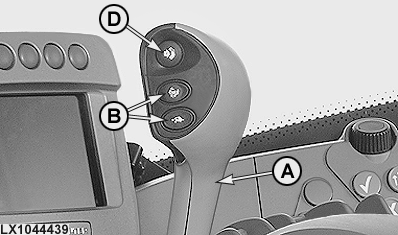
LX1044439-UN-11DEC07
Range-shift lever and buttons (with hand clutch)
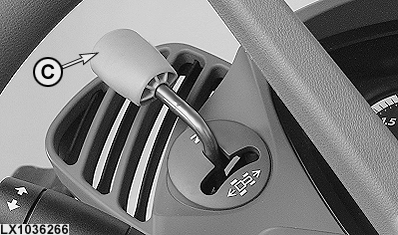
LX1036266-UN-06JUN06
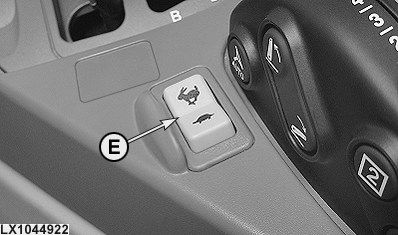
LX1044922-UN-11DEC07
A - Range-shift lever
B - Gear-shift buttons
C - Reverser lever
D - Hand clutch button
E - Gear shift switch (extra)
Gears are shifted using range shift lever (A), gear-shift buttons (B) - or switch (E) - and reverser lever (C). The hand clutch is operated via button (D).
Before starting the engine, move reverser lever (C) to neutral position. To drive, first move range-shift lever (A) to the desired range and then move the reverser lever to the desired direction of travel.
 CAUTION: If the reverser lever is actuated when the engine is
running and a range is selected, the tractor will start to move.
CAUTION: If the reverser lever is actuated when the engine is
running and a range is selected, the tractor will start to move.
To change the ranges, the clutch pedal must be depressed or the hand clutch button must be actuated. There is no need to actuate the clutch to shift gears or to change the direction of travel.
To park the tractor, move reverser lever (C) to neutral and engage park at range-shift lever (A).
IMPORTANT: Engage park only when the tractor is stationary.
NOTE: If shift lever (A) is moved to park when reverser lever (C) is not in neutral, an audible alarm is triggered and the blue “INFO” light comes on. When the engine is shut off, the reverser lever remains in its selected position but the transmission shifts into neutral.
If the reverser lever is not in neutral when the engine is started, an audible alarm is triggered and the relevant message appears on the CommandCenter to alert the operator.
If the reverser lever is moved out of neutral while park is engaged, an audible alarm is triggered and the blue “INFO” light comes on. To make the tractor move, first put the reverser lever in neutral and then move it to the desired position.
Hand clutch (if equipped)
Press button (D), the clutch separates. Ranges may be selected or the tractor can be halted.
Release button (D), the clutch engages with modulation. On tractors equipped with a seat switch (operator presence switch), the following applies: If, within the last 3 seconds before the button is released, there was no weight on the seat and no actuation of the clutch pedal or brake pedal, the tractor does not move, even although the reverser lever is in the forward or reverse position. A message appears on the CommandCenter. To make the tractor move, move the reverser lever to neutral and then back into the desired direction.
NOTE: The hand clutch is not suitable for “creeping” up to an implement.
The hand clutch can be activated and de-activated at address EPC167. See “Customization” in the “Diagnostic Trouble Codes and Customization” section.
Optimum gear-shifting for driving under load (transport):
- Select a range suitable for driving under load.
- Engage the first gear.
- Drive and shift up through the ranges until the top range is reached.
- Shift up through the gears.
Cold-weather operation
If the oil is cold (0°C, 32°F), it may affect how the reverser lever operates. At temperatures below -10°C (14°F), it may take longer to change the direction of travel. Below +5°C (41°F), the automatic engine-speed matching is de-activated.
In certain circumstances, the reverser lever may have to be actuated several times before the tractor starts to move. When the oil has had time to warm up, operation becomes normal again.
"Come-home" mode
Under certain circumstances, the tractor can still be driven in “come-home” mode even if there is an electrical fault in the transmission.
To do this, stop the engine, remove plug K07/4 (relay box K07) and re-install it at a position 90° from its original position. The wording “Come Home” must be at the top.
NOTE: In the come-home mode, engine speed is limited to 1500 rpm and only the first gear in each range is available. The hand clutch is NOT available.
Restriction in the event of a missing speed signal
If the control unit notices that the speed signal is missing, only the first three gears in each range are available.
|
OU12401,00019B1-19-20080418 |