Operating the Radio—Early Model Tractors
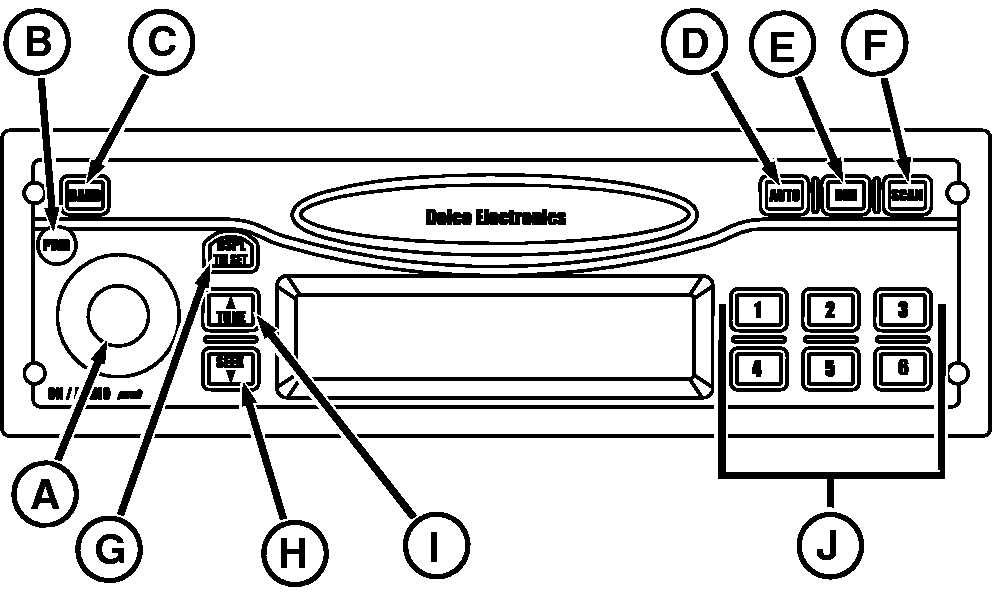
RXA0086145-UN-02FEB06
A - On/Audio/Volume
B - Power
C - Band
D - Auto Preset
E - Dim
F - Scan
G - Display/Time Set
H - Seek
I - Tune
J - Preset Stations
- Turn on receiver by depressing button ON (A) or Power (B).
- Press BAND (C) to select FM1, FM2, AM, SAT or WX (Weather).
- Press TUNE (I) once to tune to the next higher station.
- Press SEEK (H) once to tune to the next lower station.
- Press and hold both TUNE and BAND to switch between manual tune mode and ”seek” mode.
- Holding SEEK longer than half a second begins the ”seek” function. When a station with a strong enough signal is found, ”seek” function will stop at that station.
- Press SCAN (F), to scan all stations. When a strong enough signal is found, the station will play for 5 seconds then continue to scan until SCAN is pressed again.
- Adjust volume, bass, treble, fade, and balance by pressing and releasing ON/AUDIO knob (A) repeatedly until desired function appears on display. Rotate ON/AUDIO knob for adjustment.
- Adjust brightness of display by pressing (E), rotate ON/AUDIO knob to adjust.
|
OURX935,000045D-19-20080806 |