General Operation and Entering the Program Mode
Diagnosis with digital display
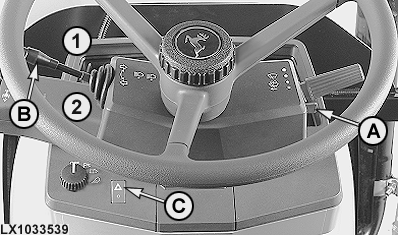
LX1033539-UN-21NOV03
A - Roll-mode switch
B - Turn-signal lever
C - Hazard warning light switch
1 - Right-hand turn signal
2 - Left-hand turn signal
|
General operation |
||
|---|---|---|
|
Tractor with digital display without HMS |
Tractor with digital display and HMS |
|
|
Entering the program mode |
Move the main switch to the on position, wait for at least 4 seconds and then pull and hold roll mode switch (A) |
|
|
Selecting the control units |
Move turn-signal lever (B) once in direction 1 or 2, and pull it back again |
Move turn-signal lever (B) twice in brief succession in direction 1 or 2, and pull it back again |
|
Confirming control units |
Turn the hazard warning light switch (C) on and off |
|
|
Exiting the control unit |
Pull turn-signal lever (B) towards the steering wheel (flash-to-pass) for at least 2 seconds |
|
|
Selecting addresses (in increments of 1) |
Move turn-signal lever (B) once in direction 1 or 2, and pull it back again |
Move turn-signal lever (B) twice in brief succession in direction 1 or 2, and pull it back again |
|
Selecting addresses (in increments of 10) |
Move turn-signal lever (B) to 1 or 2, and leave it there |
|
|
Selecting addresses (interrupting an increment of 10) |
Switch off turn signal lever (B) |
|
|
Accessing input addresses (INP) |
Pull turn signal lever (B) briefly towards the steering wheel (flash-to-pass) |
|
|
Changing an input address (INP) |
Turn the hazard warning light switch (C) on and off |
|
|
Selecting information (numerical value) |
Move turn-signal lever (B) once in direction 1 or 2, and pull it back again |
Move turn-signal lever (B) twice in brief succession in direction 1 or 2, and pull it back again |
|
Switching from one item of information (numeric values) to the next |
Pull turn signal lever (B) briefly towards the steering wheel (flash-to-pass) |
|
|
Saving information |
Turn the hazard warning light switch (C) on and off |
|
|
Canceling a procedure |
Pull turn-signal lever (B) towards the steering wheel (flash-to-pass) for at least 2 seconds |
|
|
Clearing the diagnostic trouble codes |
After “CLr?” appears, switch hazard warning light switch on/off |
|
Digital display
LX1028083-UN-11DEC01
LX1028091-UN-20DEC01
LX1028092-UN-20DEC01
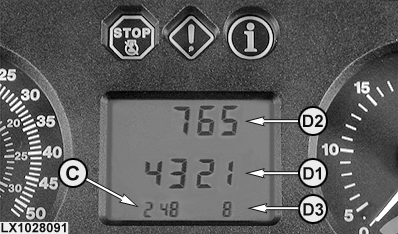
C - Address
D1 - Positions 1 - 4 on display
D2 - Positions 5 - 7 on display
D3 - Position 8 on display
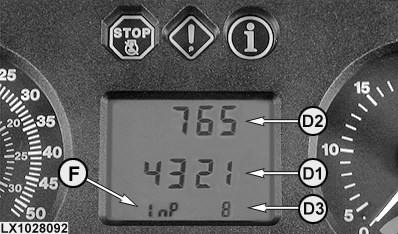
F - Input address
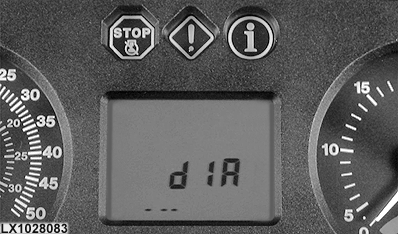
The digital display shows "diA" first. The display changes when a control unit is selected and confirmed.
The left end of the bottom line (C) on the digital display indicates the address.
If it is an input address, the display switches between address and “InP” (F).
Information is shown in the middle line (D1). If four figures are not enough, the three figures in the top row (D2) and one figure in the bottom row (D3) may be used as well. A diagnostic trouble code consisting of 8 digits (6 digits before the decimal, 2 digits after the decimal) is displayed as follows:
- Reading from left to right, the first four digits are displayed at position (D1)
- The next three digits are displayed at position (D2)
- The last digit is displayed at position (D3)
Diagnosis with Performance Monitor
LX1029025-UN-26APR02
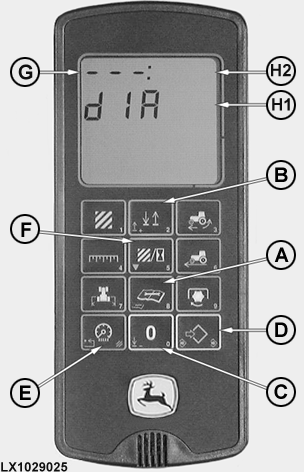
A - "Service" key
B - "2" (up) key
C - "0" (down) key
D - "Set/Save" key
E - "Clear" key
F - "5" key
G - Address
H1 - Information (positions 1 - 5)
H2 - Information (positions 6 - 8)
|
General operation |
|
|---|---|
|
Entering the program mode |
Move the main switch to the “On” position, wait for at least 8 seconds, then press the "Service" key (A) and hold it |
|
Selecting the control units |
Press "2" key (B) or "0" key (C) |
|
Confirming the control units |
Press the "Set/Save" key (D) |
|
Exiting the control unit |
Press the "Clear" key (E) |
|
Selecting addresses (in increments of 1) |
Press "2" key (B) or "0" key (C) |
|
Selecting addresses (in increments of 10) |
Press and hold "2" key (B) or "0" key (C) |
|
Accessing an input address (INP) |
Press "5" key (F) |
|
Changing an input address (INP) |
Press the "Set/Save" key (D) |
|
Inputting information (data in figures) |
Press the numbered buttons |
|
Saving information |
Press the "Set/Save" key (D) |
|
Canceling a procedure |
Press the "Clear" key (E) |
|
Clearing the diagnostic trouble codes |
After “CLr?” appears, press the "set/save" key (D) |
LX1028094-UN-20DEC01
LX1028095-UN-20DEC01
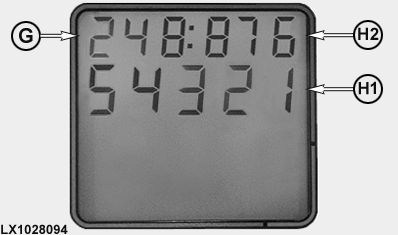
G - Address
H1 - Information (positions 1 - 5)
H2 - Information (positions 6 - 8)
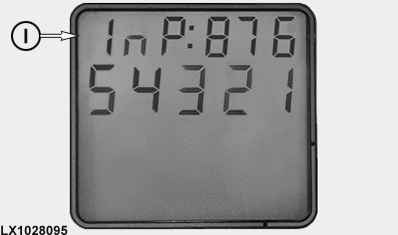
I - Input address
Display
The top row on the display is divided by a colon.
The three figures at the left of the top row show address (G).
If the address is an input address, the display alternates between the address and "InP" (I).
Information (H1) is shown on the bottom line. If five figures are not enough, the three figures on the right of top row (H2) may be used as well. A diagnostic trouble code consisting of 8 digits (6 digits before the decimal, 2 digits after the decimal) is displayed as follows:
- Reading from left to right, the first five digits are displayed at position (H1)
- The next three digits are displayed at position (H2)
Entering the program mode
LX1026535-UN-27APR01
With digital display:
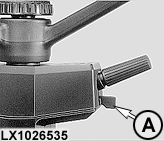
The main (key) switch must be at "IGN" for longer than 4 seconds. Actuate roll-mode switch (RMS) (A) and hold it until the display changes to “Dia”.
- OK: Go to “Accessing Addresses and Diagnostic Trouble Codes”.
- NOT OK: Contact dealer.
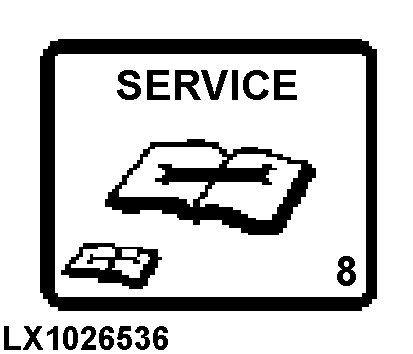
LX1026536-UN-27APR01
The main (key) switch must be at "IGN" for longer than 8 seconds. Hold the “Service” key until the display changes to “Dia”.
- OK: Go to “Accessing Addresses and Diagnostic Trouble Codes”.
- NOT OK: Contact dealer.
|
OU12401,0001A7B-19-20080901 |