Rename iTEC Implement/Sequence
iTEC - Keyboard
LX1045738-UN-18AUG10
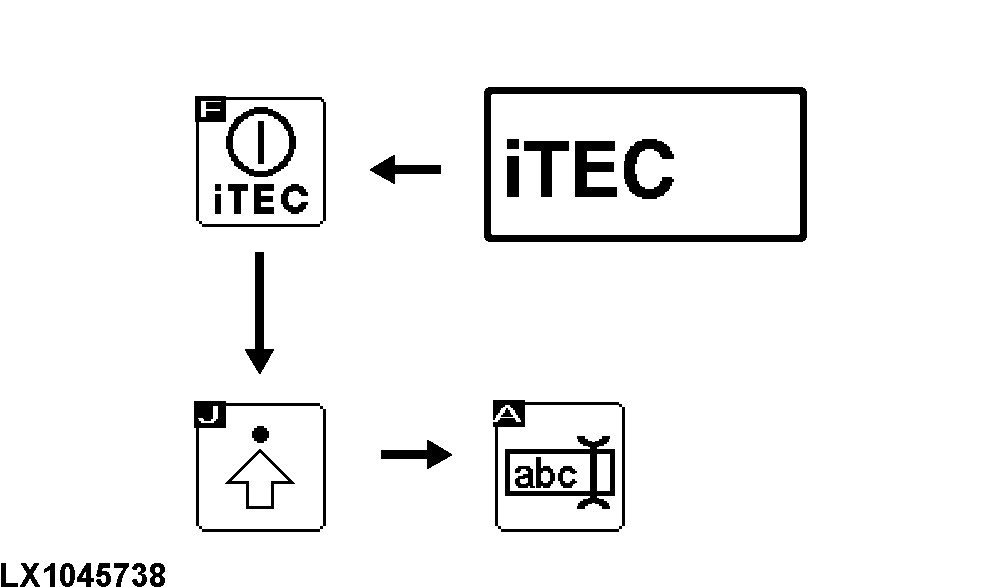
iTEC→Advanced Settings→Edit Implement Designation
LX1045730-UN-17AUG10
On the editing page only:
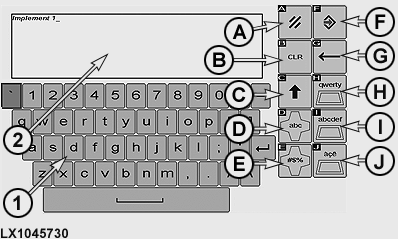
Select the drop-down box for implement selection and use softkey [abc] to activate the keyboard, and rename the implement.
|
1 |
Keyboard |
|
|
2 |
Editing Box |
|
|
A |
Cancel Softkey |
End without saving changes. |
|
B |
Delete Softkey |
Deletes entries in the editing box. |
|
C |
Shift Softkey |
Alternates between upper and lower case letters. |
|
D |
Alphabet Mode Softkey |
Entering and changing figures and words. |
|
E |
Softkey for Figures/Mathematical Mode |
Entering and changing special characters. |
|
F |
Save/Enter Softkey |
Saving changes and returning to previous page. |
|
G |
One-Space Back Softkey |
Moves cursor back one space in editing box. |
|
H |
Softkey Keyboard - Standard Layout |
Entering and changing figures and words in standard keyboard layout. |
|
I |
Softkey Keyboard - Alphabetical Layout |
Entering and changing figures and words in alphabetical keyboard layout. |
|
J |
Softkey Keyboard - Special Character Layout |
Entering and changing special characters. |
iTEC - Figure Block
RXA0107389-UN-16APR10
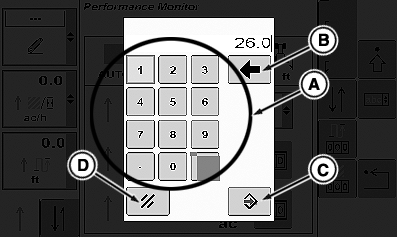
Block of figures for setting distances
On the editing page only:
If an input field for distance or other numerical values is selected, the figure block appears, allowing values to be edited.
|
A |
Figure Block |
|
B |
Back Button |
|
C |
Save/Enter |
|
D |
Cancel |
|
OULXA64,000269C-19-20101124 |