AM/FM Home Page for Premium Radio on the CommandCenter™
RXA0113181-UN-27JAN11
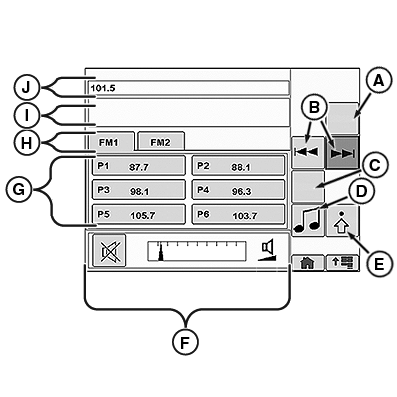
FM Home Page Shown
A - Scan
B - Seek Forward/Back
C - Band
D - Source Select
E - Audio Settings
F - Volume Control
G - Presets 1 - 6
H - Tabs for FM1 and FM2
I - Display Area 1
J - Display Area 2
Scan softkey (A) will scan available radio stations and pause for 8 seconds before moving onto the next station. To cycle through channels use Seek Forward/Back softkeys (B). Six presets can be programmed in the Preset Stations softkeys (G). To change a preset, select and hold the preset for 3 seconds. Two banks of presets are available or FM home page. Cycle through the banks using the tabs (H).
Band softkey (C) allows operator to cycle through radio tuner sources (AM, FM, Weather and XM). The Select Source softkey (D) gives the operator the ability to cycle through radio tuner sources and external source (see Premium Radio Source Select on the CommandCenter™ in this section).
In Display Area 1 (I) artist name and song name will be visible if available from the radio station. In Display Area 2 (J) channel number, preset number and station name will be visible.
AM and Weather home pages are similar to FM home page.
|
CommandCenter is a trademark of Deere & Company |
OULXBER,0001C67-19-20120405 |