Indicator Lights and Displays
Indicator lights
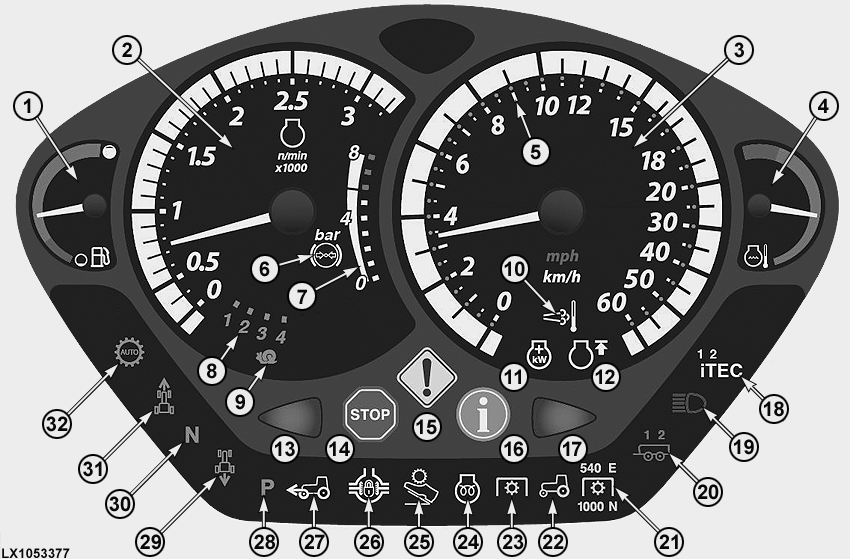
LX1053377-UN-14FEB12
1 - Fuel gauge - Informs operator how much fuel is left in the tank.
2 - Tachometer - Indicates crankshaft speed in revolutions per minute.
3 - Speedometer - Indicates travel speed in mph or km/h.
4 - Coolant temperature gauge - Monitors coolant temperature.
5 - LEDs around the speedometer indicate preselected speed band (AutoPowr™/IVT™ only).
6 - Brake pressure warning light - Shines red until the pneumatic trailer brake has reached operating pressure. Then the icon shines white.
7 - Indicates current air pressure in pneumatic trailer brake.
8 - Gear indicator - With PowrQuad™ PLUS or AutoQuad™ PLUS transmission, figures 1-4 indicate which gear is selected.
9 - This light comes on when the AutoPowr ™/ IVT™ transmission is in creeper mode.
10 - Indicator light for exhaust filter cleaning - Comes on during the cleaning phase.
11 - Indicator light for IPM (Intelligent Power Management). The icon lights up when IPM is activated.
12 - Indicator light for FieldCruise™. The icon lights up when FieldCruise™ is activated.
13 - Flashing indicator light on left - Starts flashing when turn-signal or hazard warning lights are switched on for left turn.
14 - Red STOP light - Flashes when a serious malfunction occurs. Shut off the engine IMMEDIATELY. Review the error message in the CommandCenter™ and eliminate the cause.
15 - Yellow CAUTION light - Flashes when a malfunction occurs (review the error message in the CommandCenter). This light also flashes if the emergency brake is applied with the engine running and the reverser lever set to any position other than neutral.
16 - Blue INFO light - Comes on when there is a fault in an electrical component associated with the hydraulic system or transmission. Review the error message in the CommandCenter™ and eliminate the cause. See your John Deere™ dealer, if necessary.
17 - Flashing indicator light on right - Starts flashing when turn-signal or hazard warning lights are switched on for right turn.
18 - iTEC™ indicator light - Comes on when iTEC™ is switched on; indicates the number of the user setting that is currently selected.
19 - High-beam indicator light - Comes on when headlights are switched on at high beam.
20 - Trailer turn-signal indicator light - Flashes if the tractor has one or two trailers. The indicator light starts flashing when turn-signal or hazard warning lights are switched on.
21 - Rear PTO indicator lights - Indicate together with light (22) which PTO speed is selected at the rear PTO. E and N indicate which mode is currently active.
22 - Comes on together with (21) or (23) to indicate whether front or rear PTO is switched on.
23 - Front PTO indicator light - Comes on together with light (22) whenever the front PTO is switched on.
24 - Prewarm indicator light - Comes on when the main (key) switch is turned one position to the right. Wait till the light goes out before starting the engine.
25 - Indicator light for accelerator pedal mode - Comes on as soon as accelerator pedal mode is activated (AutoPowr™ / IVT™ only).
26 - Differential lock indicator light - Comes on when differential lock is switched on.
27 - Front-wheel drive indicator light - Comes on when front-wheel drive is switched on.
28 - Park position indicator light - Comes on whenever the reverser lever is in park position (AutoPowr™ / IVT™).
29 - Reverse travel indicator light - Comes on whenever the reverser lever is in reverse position.
30 - Neutral indicator light - Comes on whenever the reverser lever is in neutral position.
31 - Forward travel indicator light - Comes on whenever the reverser lever is in forward position.
32 - Indicator light for Auto transmission mode - Comes on whenever the automatic mode of an AutoQuad™ PLUS or AutoPowr™ / IVT™ transmission is activated.
Bulb test: As the engine is started, all the lights (icons) should glow for approx. 1 second. If not, a defective LED or blown fuse may be the cause. Check and replace parts as necessary.
NOTE: Only lights related to functions that the tractor is equipped with will glow.
The indicator lights go out as soon as the engine is running.
NOTE: Travel speed can be displayed in km/h or MPH. This setting can be made at the CommandCenter™. In this section, see the Units of Measurement screen in CommandCenter settings.
Fuel gauge
LX1036201-UN-31MAY06
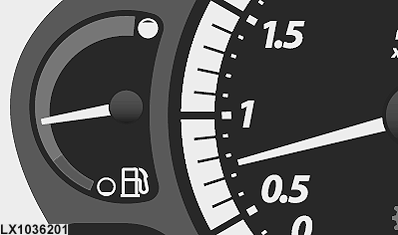
The fuel gauge shows the amount of fuel in the tank, from full to empty (end of red).
NOTE: When the gauge goes from the green to the red, approx. 18% of the total capacity is left in the tank.
NOTE: Never run the tank completely dry, otherwise you will have to bleed the fuel system.
Coolant temperature gauge
LX1036202-UN-31MAY06
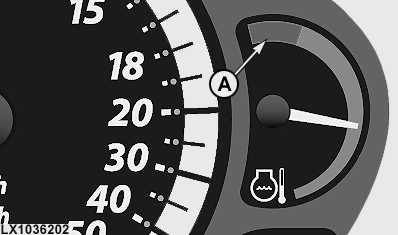
If the coolant gauge needle moves into the red (A), the engine is overheating. Immediately reduce load or shift to a lower gear. If the needle does not go back immediately, stop the tractor and run the engine at slow idle. If that does not help, shut off the engine, determine the cause of overheating (coolant level low, dirty radiator or dirty radiator screen), and rectify.
Other control systems
LX1049740-UN-26APR10
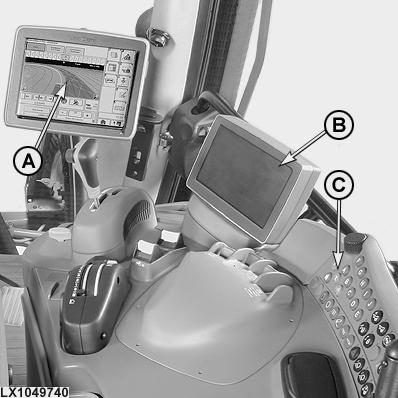
A - GreenStar™ Monitor (Optional)
B - CommandCenter™
C - CommandCenter™ Control Panel
- - AutoTrac™ (not illustrated)
NOTE: Information on how to operate CommandCenter™, GreenStar™ and AutoTrac™ can be found in Section 16.
|
OULXA64,00028F3-19-20120214 |