Phone Settings on the CommandCenter™
RXA0117320-UN-18MAY11
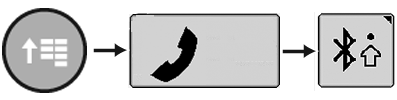
CommandARM™ Menu Button → Phone → Bluetooth® Settings Softkey
RXA0121548-UN-31OCT11
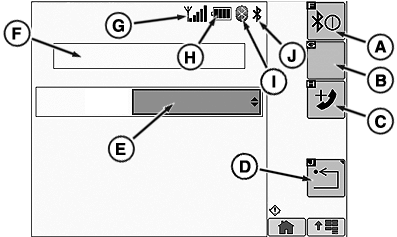
Bluetooth® Settings Page
A - Bluetooth On/Off Softkey
B - Change Active Phone Softkey
C - Add Phone Softkey
D - Return Softkey
E - Paired Phone List
F - Message Box
G - Phone Signal Strength
H - Phone Battery Strength
I - Paired Bluetooth® Indicator
J - Bluetooth® Power Indicator
Select Menu button.
Select Phone Softkey.
Select Bluetooth® Settings Softkey.
To turn the radio's Bluetooth® feature ON, select the Bluetooth® ON/Off softkey (A). When the radio's Bluetooth® feature is ON, Bluetooth® Power Indicator (J) is active.
To add a phone:
NOTE: Not ALL cell phones will be able to use the radio's Bluetooth® feature.
-
Select the Add Phone softkey (C).
Adding Phone is displayed followed by a Pin number "PIN XXYY" in the Message Box (F).
- On your cell phone, select Add New Device in the Bluetooth® menu.
- Select Bosch-BT from the list of available Bluetooth® devices on your cell phone.
- Select Bond With Device on your cell phone.
- Enter the PIN that is shown in the Message Box (also on the faceplate).
Once a cell phone is connected successfully, Phone Connected is displayed in the Message Box. When a cell phone is actively connected to the radio, Paired Bluetooth® Indicator (I) is active. Up to 5 cell phone pairings can be stored in the radio's Bluetooth® feature.
When a phone is first paired with the radio’s Bluetooth® feature, the cell phone is automatically in sync with its phone book.
Radio will send a BT phonebook request before sync starts. If that is not accepted on your phone, the phonebook feature will be disabled.
To change an active cell phone:
Select the desired cell phone from the Paired Phone List (E). Once the desired cell phone is selected, select the Change Active Phone softkey (B). The first phone in the Paired Phone List is the current active phone.
To re-sync your cell phone:
- Cycle cell phone Off, then back On.
NOTE: Make sure that your cell phone's Bluetooth® ability is enabled when trying to pair a cell phone to the radio Bluetooth® feature.
To delete a cell phone:
To delete phone, turn Bluetooth® off.
To delete phone from display:
Within Bluetooth® setup menu, select "unpair/disconnect from Bosch Radio".
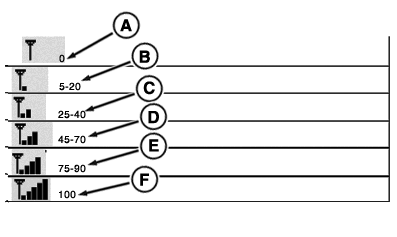
Five Phone Signal Strength bars (G) indicate maximum cell phone signal strength.
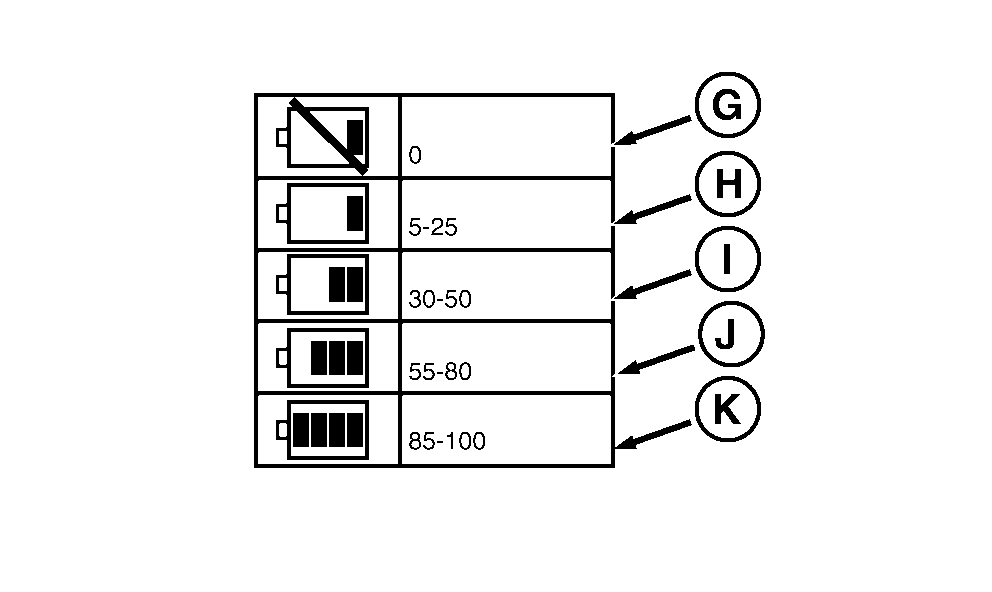
Four phone Battery Strength bars (H) indicate maximum cell phone battery strength.
Detailed signal and battery strength displays are listed in the graphics to the right.
RXA0121552-UN-31OCT11
Signal Strength
RXA0121554-UN-31OCT11
A - No Signal
B - 5—20 Percent Signal Strength
C - 25—40 Percent Signal Strength
D - 45—70 Percent Signal Strength
E - 75—90 Percent Signal Strength
F - 100 Percent Signal Strength
G - No Battery Power
H - 5—25 Percent Battery Power
I - 30—50 Percent Battery Power
J - 55—80 Percent Battery Power
K - 85—100 Percent Battery Power
|
OULXBER,0001C56-19-20120220 |