Operating PTOs
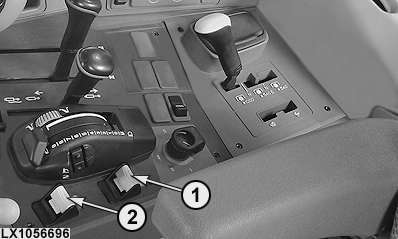
LX1056696-UN-05SEP12
Tractor with Cab Shown
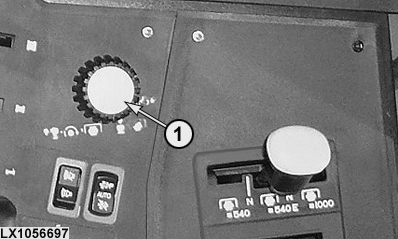
LX1056697-UN-10JUL12
Tractor without Cab Shown
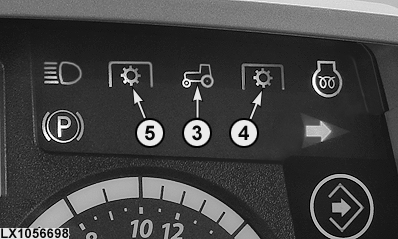
LX1056698-UN-05SEP12
1 - Rear PTO Switch
2 - Front PTO Switch
3 - PTO Indicator Light
4 - Rear PTO Indicator Light
5 - Front PTO Indicator Light
 CAUTION: Always disengage the PTO when not in use.
CAUTION: High-inertia implements do not come to a standstill
the moment a PTO is shifted to the disengaged position. Do NOT approach
the implement while it is coasting down. Do not work on the implement
until it has stopped.
To switch on the PTOs, press switch (1) or (2) down and then forward. The PTO starts to rotate and indicator lights (3) and (4) or (3) and (5) light up.
The current speeds of the PTOs are displayed on the PTO page of the digital display.
To switch off the PTOs, pull switch (1) or (2) back. Indicator lights (3) and (4) or (3) and (5) go out.
NOTE: If the engine is shut off and then restarted while the PTO is running, the PTO will not operate.
In the case of the rear PTO, indicator lights (3) and (4) remain on.
In the case of the front PTO, indicator light (5) goes out but indicator light (3) remains on.
To continue working, switch off the PTO and switch it on again.
|
OULXA64,0002ADE-19-20120711 |