Digital Display - Display Properties (Basic Settings)
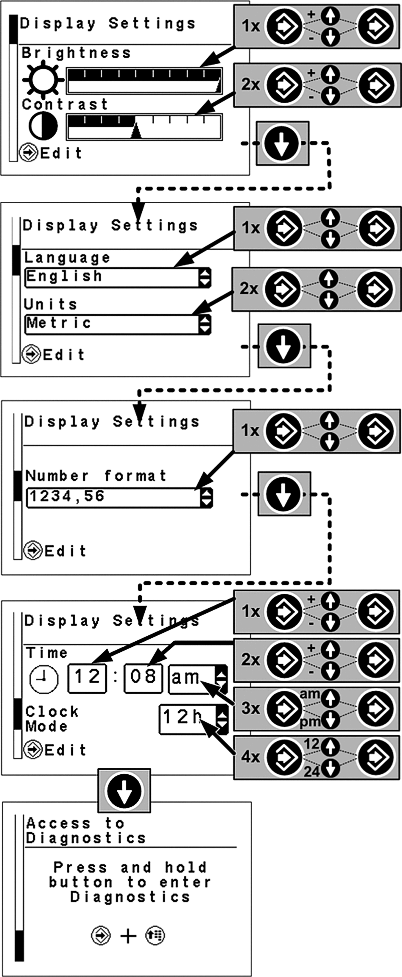
LX1057724-UN-03JUL12
- Confirm button - Select; save
- Arrow buttons - Go to another page; change settings
- Menu button - Exit; back
-
Access menu: Press the menu button until the page at the top of the illustration shown opposite is displayed.
-
Brightness and contrast:
Use the confirm button to select the input area for brightness and use the arrow buttons to change settings. Then save using the confirm button.
Use the confirm button to select the input area for contrast and use the arrow buttons to change settings. Then save using the confirm button.
Access the next page by means of the down arrow button.
-
Language settings and units: Use the confirm button to select the input area for language and use the arrow buttons to change the setting. Then save using the confirm button.
Use the confirm button to select the input area for units and use the arrow buttons to change the setting. Then save using the confirm button.
Access the next page by means of the down arrow button.
-
Number format: Use the confirm button to select the input area for number format and use the arrow buttons to change the setting. Then save using the confirm button.
Access the next page by means of the down arrow button.
-
Time: Use the confirm button to select the input area for hours and use the arrow buttons to change the setting. Hours, seconds and time format can be changed. Then save the setting using the confirm button.
Access the next page by means of the down arrow button.
-
Access diagnostic trouble codes: This function will be explained in Section "Diagnostic Trouble Codes and Customization".
Press the up arrow button to return to the previous page.
Press the menu button to exit.
|
OULXBER,0001C79-19-20120709 |