Automatic Exhaust Filter Cleaning
LX1057739-UN-06JUL12
LX1057740-UN-06JUL12
Access the first page in the engine menu of the digital display, see the relevant text in this Section.
NOTE: An automatic exhaust filter cleaning must be canceled, if you wish to start an exhaust filter cleaning with tractor parked.
Activating the automatic exhaust filter cleaning function (recommended setting):
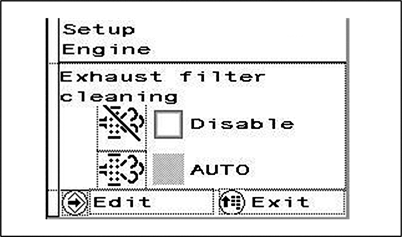
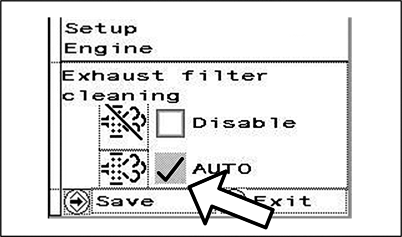
Access the first page of the engine menu. Press the confirm button and the page shown opposite will be displayed. Select the check box for automatic exhaust filter cleaning (AUTO). Activate the check box with a tick. Press the confirm button to save this setting. An indicator light comes on to show that the exhaust filter is currently being cleaned (see illustration at the bottom).
NOTE: Depending on the conditions under which the tractor is operating, engine control may raise the slow idle speed. In some cases, the digital display shows a message instructing the operator to change operational conditions. Comply with these instructions if the situation allows.
Deactivate the automatic exhaust filter cleaning function:
Select the check box to deactivate automatic exhaust filter cleaning. Press the arrow button and activate the check box with a tick. Press the confirm button to save this setting.
Do not deactivate automatic exhaust filter cleaning unless it is absolutely necessary.
IMPORTANT: See also Clean Exhaust Filter Safely in Section 05.
NOTE: See also Access the Engine Menu on the Digital Display.
|
OULXBER,0001C7F-19-20120709 |