Digital Display - More Settings
Inputs for area calculation:
LX1057755-UN-12JUL12
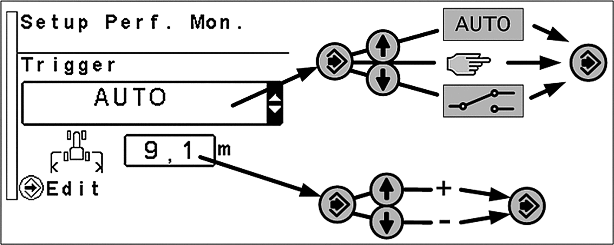
Press the menu button until the page shown is displayed.
The first input area is used to select which function is used for area calculation. Possible options are: AUTOMATIC, MANUAL and IMPLEMENT SWITCH.
In the second input area the working width of the implement is determined.
Calibrate John Deere™ Dual-Beam Radar (if Equipped)
LX210514-UN-14APR14
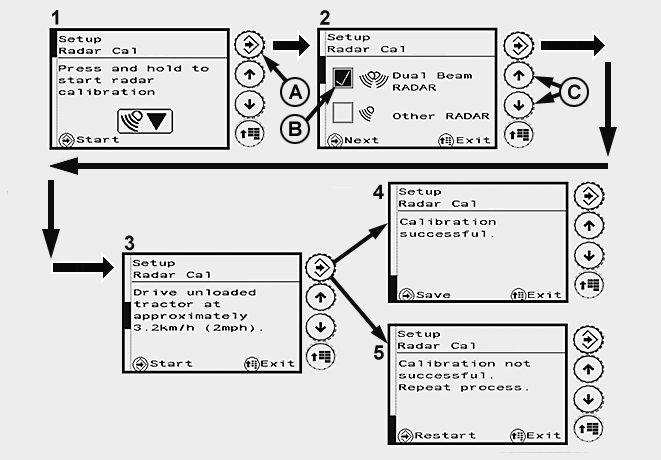
Calibrate John Deere™ Dual-Beam Radar
A - Confirm Button
B - Check Box, John Deere™ Dual-Beam Radar Activated
C - Arrow Buttons for Selecting Radar
IMPORTANT: Radars from external suppliers must always be calibrated manually. See Calibrate Other-Make Radars Manually.
NOTE: Use automatic calibration for John Deere™ dual-beam radar only.
-
Press the menu button until page (1) appears on the display.
Press and hold the confirm button (A) until page (2) appears on the display.
-
On page (2), use arrow buttons (C) to activate the check box (B) for John Deere™ dual-beam radar. Press the confirm button until page (3) appears on the display.
-
Drive the unladen tractor at a speed of approx. 3.2 km/h (2 mph) and press the confirm button.
-
Stop the tractor when either page (4) or page (5) appears on the display.
• If calibration is successful, page (4) appears on the display. Press the confirm button to save.
• If calibration is unsuccessful, page (5) appears on the display. Press the confirm button until page (2) appears on the display and perform calibration again.
NOTE: If calibration fails at three successive attempts, contact your John Deere™ dealer.
NOTE: After the radar has been calibrated successfully, match wheel speed to radar sensor speed. See Match Travel Speed to Radar Sensor Speed.
Calibrate Other-Make Radars Manually (if Equipped)
LX210512-UN-14APR14
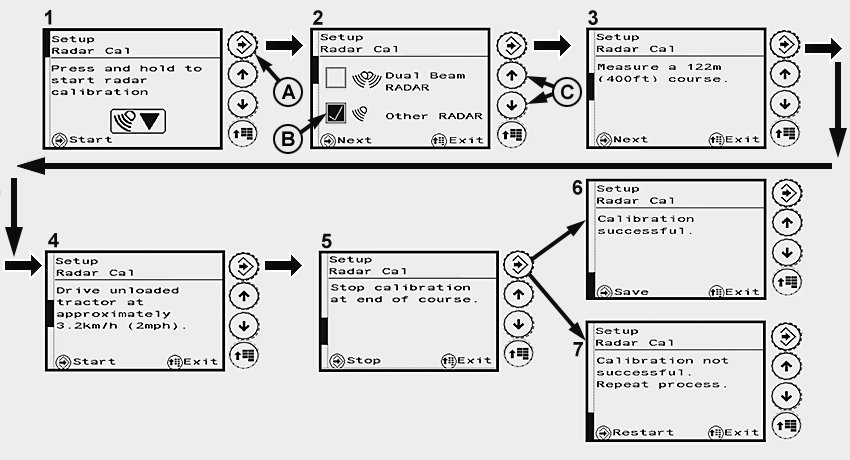
Calibrate Other-Make Radars Manually
A - Confirm Button
B - Check Box, Other-Make Radar Activated
C - Arrow Buttons for Selecting Radar
NOTE: Do not perform manual calibration in John Deere™ dual-beam radar.
Use automatic calibration for John Deere™ dual-beam radar only. See Calibrate John Deere™ Dual-Beam Radar.
Manual calibration of the radar involves calculating the pulses of the radar sensors in relation to travel speed. Comparison between travel speed and radar sensor speed is performed automatically.
Preliminary work:
Tractor with no load (unladen)
On a hard level dry surface, mark out a 122 m (400 ft.) course. Place easily visible markers at the start and end of the measured course.
Place the tractor at a suitable distance from the starting line of the measured course.
Calibration:
-
Press the menu button until page (1) appears on the display.
Press and hold the confirm button (A) until page (2) appears on the display.
-
On page (2), use arrow buttons (C) to activate the check box (B) for other-make radar. Press the confirm button until page (3) appears on the display.
-
Press the confirm button; page (4) appears on the display. Drive the unladen tractor at a speed of approx. 3.2 km/h (2 mph) and press the confirm button as it crosses the starting line. Page (5) appears on the display.
-
When the tractors crosses the finishing line, press the confirm button to complete calibration. Stop the tractor.
-
Either page (6) or page (7) appears on the display.
• If calibration is successful, page (6) appears on the display. Press the confirm button to save.
• If calibration is unsuccessful, page (7) appears on the display. Press the confirm button until page (2) appears on the display and perform calibration again.
NOTE: If calibration fails at three successive attempts, contact your John Deere™ dealer.
NOTE: After the radar has been calibrated successfully, match wheel speed to radar sensor speed. See Match Travel Speed to Radar Sensor Speed.
Match Travel Speed to Radar Sensor Speed
LX210513-UN-06MAY14
Changing the size of the tires can result in deviations with regard to the speed actually travelled. Matching involves recalculating the tire rolling characteristics, which is required to calculate travel speed.
Tractors with a radar sensor can make a comparison between displayed travel speed and travel speed that is actually measured.
Preliminary work:
On a hard, level, dry surface in the open, drive the unladen tractor.
Calibration:
-
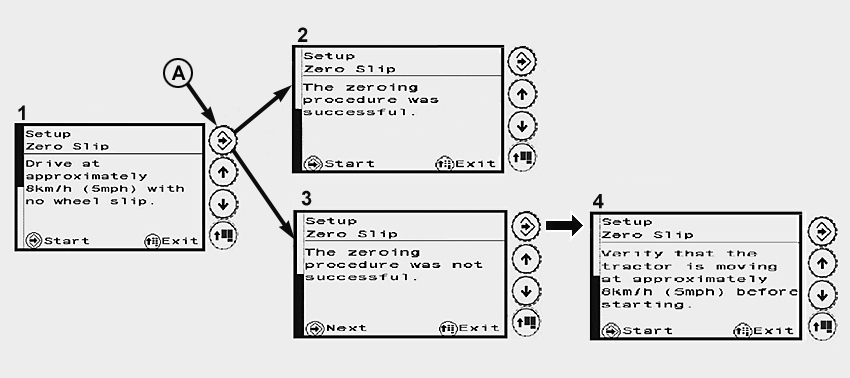
Press the menu button until page (1) appears on the display.
-
Drive the tractor at a speed of approx. 8 km/h (5 mph) and press the confirm button (A).
NOTE: Make sure that the tractor is moving at the required speed of 8 km/h (5 mph).
If the speed is too low, the confirm button does not appear on the display and cannot be pressed.
-
Stop the tractor when either page (2) or page (3) appears on the display.
• If calibration is successful, page (2) appears on the display. Press the confirm button to save.
• If calibration is unsuccessful, page (3) appears on the display. Press the confirm button until page (4) appears on the display.
Press the confirm button and perform calibration again.
NOTE: If calibration fails at three successive attempts, contact your John Deere™ dealer.
|
OULXBER,0001C89-19-20140703 |