Indicator Lights and Displays
Indicator lights
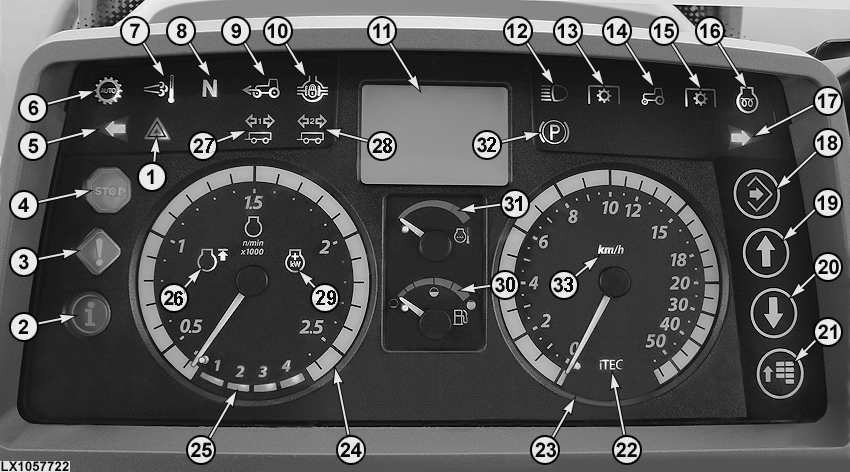
LX1057722-UN-21SEP12
- Indicator Light for Hazard Warning Light
- Blue INFO light - Comes on when there is a fault in an electrical component associated with the hydraulic system or transmission. Review the error message on the digital display and eliminate the cause. See your John Deere™ dealer, if necessary.
- Yellow CAUTION Light - Flashes when a fault occurs (review the error message on the digital display).
- Red STOP light - Flashes when a serious fault occurs. Shut off the engine IMMEDIATELY. Review the error message on the digital display and eliminate the cause.
- Flashing Indicator Light on Left - Flashes when turn-signal light for left turn is on and when hazard warning lights are on.
- Indicator Light for Automatic Mode of Transmission - Comes on whenever the automatic mode of the AutoQuad™ PLUS transmission is activated.
- Indicator Light for Exhaust Filter Cleaning - Comes on during the cleaning phase. On tractors with exhaust cleaning system only.
- The indicator light will alternate between F, N, R and P, depending on the position of the reverse drive lever.
- Front-Wheel Drive Indicator Light - Comes on when front-wheel drive is on.
- Differential Lock Indicator Light - Comes on when differential lock is on.
- Digital Display - Displays information for the operator and is used as a graphical user interface.
- The high beam indicator light will come on when switch is in “high beam” position.
- This light comes on when front PTO is switched on.
- Comes on together with (13) and (15) to indicate whether front or rear PTO is switched on.
- This light comes on when rear PTO is switched on.
- Prewarm indicator light - Comes on when the ignition switch is turned one position to the right. Do not start the engine before the light has turned off. This light flashes when problems with the fuel system and the engine are present. On tractors equipped with a water-in-fuel sensor, this light flashes when water is present in the fuel filter.
- Flashing Indicator Light on Right - Flashes when turn-signal light for right turn is on and when hazard warning lights are on.
- Enter Button
- Up Arrow Button
- Down Arrow Button
- Menu Button
- Indicator light shows if iTEC™ is activated.
- Speedometer - Indicates travel speed in mph or km/h.
- Tachometer - Indicates crankshaft speed in revolutions per minute.
- Gear Indicator - With PowrQuad™ PLUS or AutoQuad™ PLUS transmission, figures 1-4 indicate which gear is selected.
- Indicator light is on when cruise control is active (FieldCruise™).
- Trailer turn signal indicator light - Flashes when a trailer is attached to the tractor. The indicator light flashes when turn-signal light is on and when hazard warning lights are on.
- Trailer Turn Signal Indicator Light - Flashes when a second trailer is attached to the tractor. The indicator light flashes when turn-signal light is on and when hazard warning lights are on.
- Indicator light equipped, but without function.
-
The fuel gauge shows the amount of fuel in the tank, from full
to empty (end of red zone).
NOTE: When the gauge goes from the green to the red, approx. 18% of the total capacity is left in the tank.
NOTE: Never run the tank completely dry, otherwise you will have to bleed the fuel system.
- Coolant Temperature Indicator (explained separately).
- Comes on when the park brake is activated.
- Indicates whether speed is shown in mph or km/h.
Light test: As the engine is started, the lights will come on for approx. 1 second. If this is not the case, a defective bulb or blown fuse may be the cause. Replace part.
Once the engine is running, the indicator lights must turn off.
Digital display
The digital display shows different types of information for the operator:
- Time
- Operating hours
- Travel speed
- Engine speed
- Rear PTO speed
- Wheel slip in % (if equipped with radar)
- Distance traveled
- Current fuel consumption
- Average fuel consumption
- Total area covered (since beginning of measurement)
- Area covered per hour
In addition, the digital display is used to make various settings. Refer to the descriptions of Intelligent Power Management, exhaust cleaning system, iTEC™ Basic and hitch.
|
SS31170,000042F-19-20131021 |