Premium Front Hitch - Set Transport Position and Operating Depth

RXA0132258-UN-22MAY13
Menu Button → Tractor Settings → Front Hitch
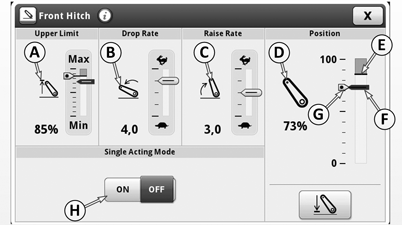
LX1057405-UN-06MAY14
A - Display Field for Raise Height Limit
B - Display Field for Rate-of-Drop
C - Display Field for Raise Rate
D - Front Hitch Position/Status Display
E - Currently Set Raise Height Limit
F - Current Position of Front Hitch
G - Saved Operating Depth
H - Front Hitch Mode, Single-Acting ON/OFF
To avoid accidental damage to the tractor and mounted implement, set the desired transport position and operating depth. The hitch system regulates the oil flow so that the hitch slows down as it approaches the set endpoints.
When front hitch mode "single-acting" is ON (H), the front hitch lowers in a pressure-free state due to the weight of the implement.
Raise height limit (A), raise rate (C) and rate-of-drop (B) of the front hitch can also be set. See the following pages.
-
To set the transport position and operating depth, select the menu button.
-
Select tractor settings.
-
Select front hitch.
-
Select front hitch position/status indicator (D).
-
Adjust the raise height limit, transport position and operating depth by moving the thresholds.
-
To save, close page.
|
OULXA64,0003175-19-20140729 |