Front Hitch (Premium) - Set the Lift Rate

RXA0132258-UN-22MAY13
Menu Button → Tractor Settings → Front Hitch
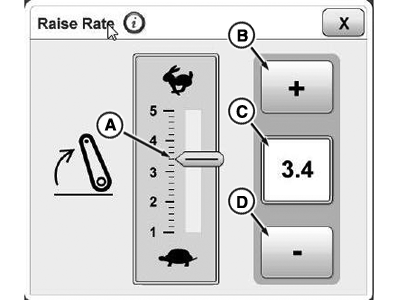
RXA0132459-UN-27JUN13
A - Raise Rate
B - + Button
C - Display Field
D - — Button
-
To set the lift rate, select the menu button.
-
Select tractor settings.
-
Select front hitch.
-
Select display panel for lift rate.
-
Use the +/— buttons to set the desired lift rate (A).
-
To save, close page.
|
OULXA64,0003176-19-20131209 |