Front Hitch (Premium) - Set the Raise Height Limit

RXA0132258-UN-22MAY13
Menu Button → Tractor Settings → Front Hitch
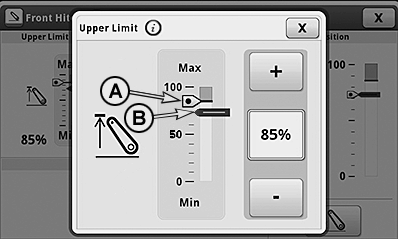
LX1057406-UN-07MAY14
A - Raise Height Limit
B - Current Position of Front Hitch
-
To adjust the raise height limit, select the menu button.
-
Select tractor settings.
-
Select front hitch.
-
Select the display field for raise height limit.
-
Use the +/— buttons to set the desired raise height limit (A).
-
To save, close page.
NOTE: Changes to the raise height limit take place immediately.
NOTE: If the raise height limit (A) is set below the current hitch position (B), the hitch follows raise height limit (A).
|
OULXA64,0003332-19-20140630 |