Diagnostic Trouble Codes

PC15332-UN-08JUL13
A - Refresh Button
B - Clear Codes Button
Diagnostic Trouble Codes tab displays all current and stored codes that have occurred on the system.
Select Refresh button (A) to clear, and then retrieve all codes.
Select Clear Codes button (B) to remove all codes from display.

PC15333-UN-09JUL13
Code Types
A - Stop Alert
B - Service Alert
C - Info Alert
Viewing and SortingSelect button next to View by to change the way codes are displayed. Available views are:
Code
- View by “Code” lists all codes on display. Code Type (A—C), Details, Status, and Count are all displayed. Select a code from list to view Code Details.
Device
- View by “Device” lists all controllers on CAN Bus. Device ID, CAN Network, and if device has codes are all displayed. Select a controller in list to view Device Codes.
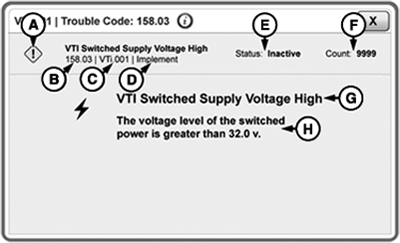
PC15334-UN-09JUL13
Code Details
A - Diagnostic Trouble Code Type
B - Diagnostic Trouble Code Number
C - Device ID
D - CAN Bus Network
E - Code Status
F - Count
G - Diagnostic Trouble Code
H - Diagnostic Trouble Code Description
Code DetailsSelect a diagnostic trouble code to view code details.
|
DX,PC,DIAG,DTC-19-20151222 |