Brightness

PC15319-UN-20MAY13
A - Day Mode
B - Night Mode
Brightness and Color Mode
- Auto Mode
Auto Mode is recommended setting. This synchronizes display brightness with cab light switch. If cab lights are off, display is in Day Mode. If cab lights are on, display is in Night Mode.
- Day and Night Modes
Select either mode to prevent display brightness from synchronizing with cab light switch.
NOTE: The mode selected does not adjust brightness of a second display. Adjust brightness of that display through its settings.

PC15320-UN-20MAY13
PC15321-UN-20MAY13
A - Day Settings
B - Night Settings
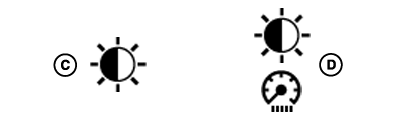
C - Display Brightness
D - Cab Brightness
Brightness SettingsSelect either settings button to display a popup page for corresponding brightness mode.
Depending on mode selected with settings button, adjust display and cab brightness by using plus (+) and minus (-) buttons.
|
DX,PC,DISP,BRIGHT-19-20151221 |