Manage Clients, Farms, and Fields
PC17389-UN-15MAY14
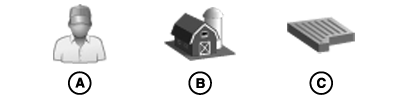
A - Client
B - Farm
C - Field
Field Organization
Use the following hierarchy to help organize data:
- Clients (A) are the highest level of organization.
- Farms (B) are the middle level of organization. A farm can be associated with a client.
- Fields (C) are the basic level of organization. A field can be associated with a farm and a client.
A strict hierarchy is not necessary, though it is possible to use only field names, and leave farm and client names blank. It is even possible not to use field names at all.
These decisions depend on amount of data being kept. More data requires structure to find fields.
NOTE: In previous John Deere displays, maps and guidance lines were saved based on field names. In the Generation 4 display, data is saved as latitude and longitude points. The field name is only needed as a way to filter data.
Select and Filter Names
In the Client, Farm, and Field hierarchy, select clients and farms to find fields.
-
Select Client tab.
-
From list, select client. Client name is displayed on Client tab.
-
Farm tab is automatically displayed. Only farms associated with the client are listed.
-
From list, select farm. Farm name is displayed on Farm tab.
-
Field tab is automatically displayed. Only fields associated with the client and farm are listed. Select field.
Remove Filter
Remove filter by selecting Clear Selections button.
Create and Edit Names
NOTE: Clients, farms, or fields should not be renamed after data is recorded. If renamed, change name in other locations, such as MyJohnDeere Operations Center.
Client, Farm, and Field names cannot be duplicated. Names associated with different clients and farms must be unique.
Client and Farm Tabs
When Client or Farm tabs are selected, select Edit button at bottom of page to display Edit Client or Edit Farm list.
On either list, select one of the client or farm names to edit it, or select New button at bottom of page to create a name.
Field Tab
When Field tab is selected, highlight field name and select edit button to edit a field. Select New button at bottom of the page to create a name.
Delete Names
To delete a name, edit the client, farm, or field, and select the delete button on the edit page.
- Deleting a client also deletes all farms, fields, and guidance tracks associated with client.
- Deleting a farm also deletes all fields and guidance tracks associated with farm.
- Deleting a field also deletes all guidance tracks associated with field.
|
DX,PC,FIELDS,MANAGE-19-20151222 |