Run Page Structure
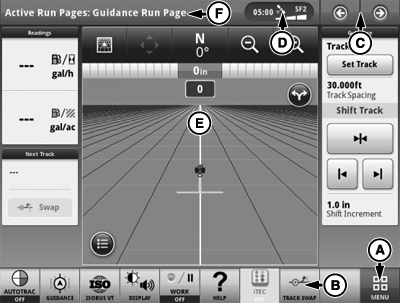
PC17353-UN-03DEC13
10 Inch Display Run Page
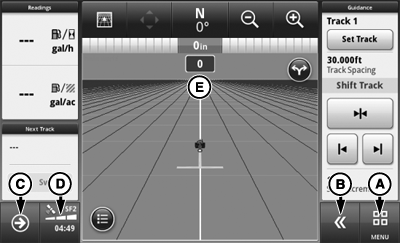
PC17354-UN-03DEC13
7 Inch Display Run Page
A - Menu
B - Shortcut Softkeys
C - Next or Previous Run Page Buttons
D - Status Center
E - Run Page
F - Title Bar/Run Page Selection
Menu (A) lists all applications installed on display and machine.
Shortcut softkeys (B) provide quick access to frequently used applications and functions. On 7 in. display, select expand button to display shortcut softkeys.
Next and Previous Run Page buttons (C) cycle through multiple run pages.
Select the area indicated (D) to display Status Center. Important information for display functions is highlighted, such as GPS signal strength and available data storage.
Run page (E) is configured using Layout Manager application.
Only on 10 in. display, press title bar (F) to display Run Page Selection page. Choose desired run page from list of available pages.
(Refer to Layout Manager application for information about customizing the run page.)
|
DX,PC,INTRO,RUNPAGE-19-20151217 |