Navigate Run Pages on Main Page

PC17357-UN-03DEC13

PC17358-UN-03DEC13
PC17359-UN-03DEC13
A - Title Bar
B - Next and Previous Run Page Buttons
C - Finger Swipe
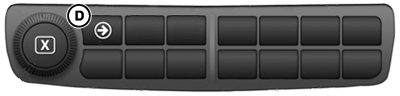
D - Navigation Bar Shortcut Button
If more than one run page is in Active Set, there are multiple ways to choose which run page is displayed on main page.
Title Bar (A)
Select title bar at top of main page to display a list of all run pages that are in Active Set. Choose a run page to return to main page.
Next and Previous Run Page Buttons (B)
Select either right or left arrows to cycle through run pages.
Finger Swipe (C)
Swipe finger across display, left and right, to cycle through run pages.
Navigation Bar Shortcut Button (D)
Select right arrow below display in CommandCenter™ Navigation Bar.
|
CommandCenter is a trademark of Deere & Company |
DX,PC,LAYOUT,NAV-19-20151222 |