Video

PC15312-UN-15MAY13
Video
 CAUTION: Do not rely on a camera for collision avoidance or
bystander detection. To avoid possible injury or death to operator
or others, always remain alert and aware of surroundings when operating
the machine. Read and understand AVOID BACKOVER ACCIDENTS in the safety
section.
CAUTION: Do not rely on a camera for collision avoidance or
bystander detection. To avoid possible injury or death to operator
or others, always remain alert and aware of surroundings when operating
the machine. Read and understand AVOID BACKOVER ACCIDENTS in the safety
section.
The Video application is used to observe areas around the machine. Only one video can be viewed at a time.
4600 processor can support up to four camera inputs, while 4100 processor can support only one camera input.
For more information about the different types of displays, see Display Introduction section.
Navigate to Video
-
Select Menu.
-
Select Applications tab.
-
Select Video application.
PC15313-UN-16MAY13
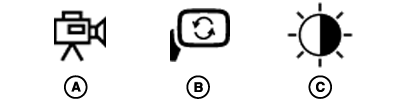
A - Camera Icon
B - Mirror Icon
C - Contrast Icon
Switching CamerasIf more than one camera is connected, choose between video inputs by selecting different camera numbers (A).
Mirror Video
Select Mirror Video button (B) to simulate a rear view mirror. This swaps left and right sides of video image.
Contrast
Adjust video contrast (C) using plus (+) and minus (-) buttons. Brighten video by selecting the plus button, and darken video by selecting minus button.
IMPORTANT: Determine if camera image or video application is mirrored before using Video application.
|
DX,PC,VIDEO-19-20151223 |