Air Comfort Seat — MSG95GL
LX1053713-UN-27JUL11
LX1053462-UN-27JUN12
 CAUTION: Adjust the seat only when the tractor is stationary.
IMPORTANT: When adjusting the seat, there is a danger of crushing. Objects placed in the cab may limit free space. Make sure that there is sufficient distance to adjacent components to prevent collisions. Accidental contact with the controls could cause the tractor or implement to operate.
IMPORTANT: Align and lock the operator's seat in driving direction as a rule when driving the tractor.
-
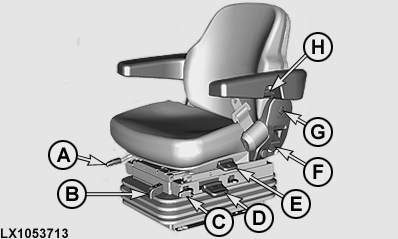
A — Fore/aft adjustment
Pull lever (A) up and move the seat to the desired position. Let the lever click into place.
-
B — Indicator scale of the weight and
height adjustment
The green mark on the scale indicates whether the weight or height setting is correct.
-
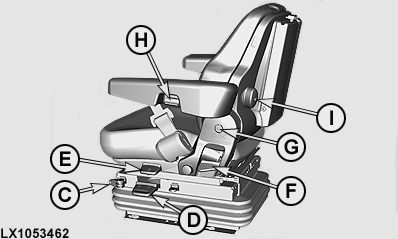
C — Adjust fore/aft suspension
- Lever (C) forward - no fore/aft suspension
- Lever (C) backward - fore/aft suspension active
-
D — Weight adjustment
The operator's seat must be occupied in order to adjust it to the operator's weight. To adjust the seat to the operator's weight, start the engine, allow the seat to settle, then pull lever (D) up or push it down until the green mark appears on the indicator scale (B).
NOTE: The operator's seat can be set for a weight of 50 to 130 kg (110 to 285 lb).
-
D — Height adjustment
After the weight adjustment has been made, the seat can be adjusted to any height. To adjust the height, pull lever (D) up as far as it will go or push it down as far as it will go. The green mark must appear on the indicator scale (B). If the top or bottom limit is reached during height adjustment, set the height slightly lower or higher to ensure a minimum amount of travel up and down (suspension).
-
E — Adjust swivel
IMPORTANT: Use the swivel to the left only for entering and exiting.
The seat swivel is operated by means of lever (E) as follows:
Pull up the lever and the seat can swivel freely to the left and right by 15°. To lock, press the lever down and seat snaps into place at the next 7.5° position.
NOTE: On versions with a multi-function lever on the armrest, swivel the operator's seat to the left only by 7.5°. Avoid collisions with the steering wheel.
-
F — Adjust tilt of backrest
Pull lever (F) upwards and hold. Tilt the angle of the backrest to the desired position and let the lever latch back in audibly.
-
G — Adjust height of armrests
At both sides, remove cover (G) and slacken off the hex. nuts. Move the armrests to the desired position and tighten the hex. nuts.
-
H — Adjust tilt of armrests
Knob (H) allows armrest tilt to be adjusted (infinitely variable). To lower the armrest by 30°, press the armrest tilt adjuster (H) into the armrest.
-
I — Adjust lumbar support on backrest
Use knob (I) to adjust the position of the lumbar support.
|
OULXA64,0002609-19-20141205 |