Lighting System - Light Switch
LX1045564-UN-28JUN10
LX1045565-UN-28JUN10
L102655-UN-15AUG94
LX1057053-UN-11JUL13
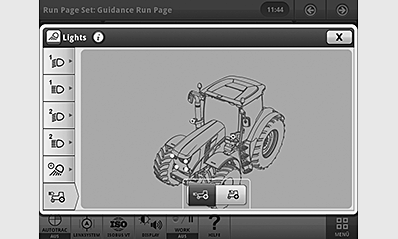
Light Page for Switch Position 3 Shown
 CAUTION: It is not permitted to use worklights (light switch
at position 4) on public roads.
CAUTION: It is not permitted to use worklights (light switch
at position 4) on public roads.
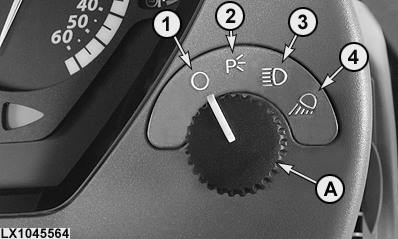
A — Light switch, positions:
- 1 — Lights switched off
- 2 — Parking lights switched on
- 3 — Headlights switched on (public roads)
-
4 — Worklights switched on (combination defined by user)
NOTE: If the light is switched on from the OFF position (1),
the relevant light page will be displayed in the CommandCenter™
for approximately 10 seconds. The operator can directly modify the
settings on the page. If he does not modify the settings, the monitoring
screen will be shown again after approximately 10 seconds.
NOTE: When worklights are switched on, the most recently used combination of lights comes on. For more information, see Lighting System - Worklights in this Section.
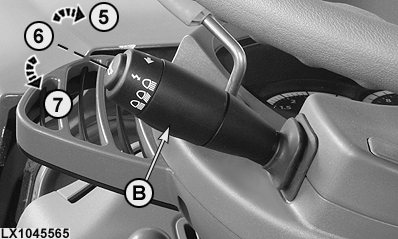
B — Switch for high/low-beam headlights, positions:
- 5 — Headlight flasher (flash-to-pass), pull switch toward steering wheel
- 6 — Low-beam, switch in center position
- 7 — High-beam, push switch away from steering wheel
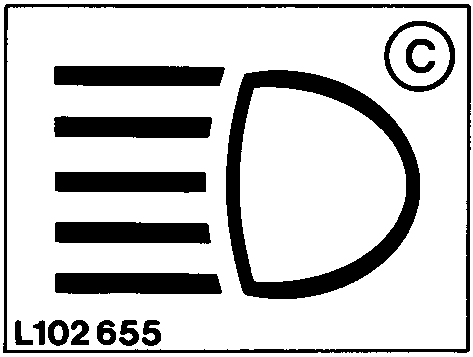
C — When high-beam headlights are switched on, the high-beam indicator light comes on.
NOTE: When the ignition is turned off, the lights are switched off automatically after approx. 5 minutes. At two minutes and one minute before this time is up, the lights flash 5 times. Lighting can be activated multiple times until the battery enters its energy-saving mode.
Each time the door is opened while the lights are on and the ignition is off, an acoustic alarm sounds for 5 seconds to remind the operator that the lights are still on.
|
OULXA64,0002E75-19-20130710 |