Lighting System - Egress Lighting
Activate the egress light function
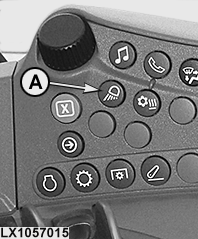
LX1057015-UN-22JAN14
Side Console
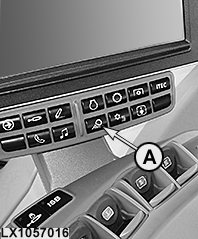
LX1057016-UN-21JAN14
CommandARM™
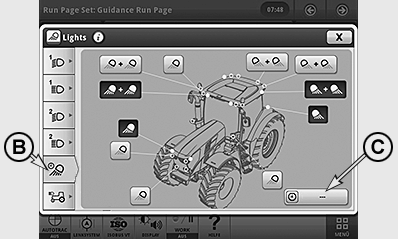
LX1057060-UN-11JUL13
Egress Light Page
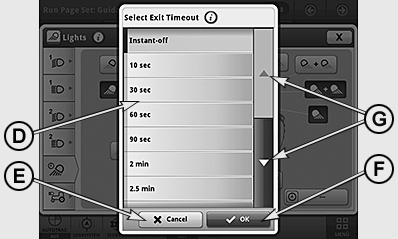
LX1057061-UN-11JUL13
Set Duration of Lighting
A - Light Button
B - Egress Light Button
C - Drop-Down Box, Duration of Lighting
D - Time Interval Selection List
E - Button, Cancel
F - Button, OK
G - Scroll Bar
The egress light function allows the operator to choose how long the individual lights remain on, after the tractor engine has been shut off (light switch and ignition OFF).
A basic distinction is drawn between the following types of egress lights:
1. Egress lighting in public traffic
=> Only the headlights (low beam) are switched on.
2. Egress lighting in field use
=> Here all headlights and worklights can be switched on.
IMPORTANT: If low-beam or high-beam headlights have been in operation for more than 10 seconds before the ignition is turned off, the egress light function activates only the low-beam headlights. (This is a road safety feature to prevent other road-users from being dazzled by the worklights.)
If the worklights were in use for longer than 10 seconds prior to the ignition and lights being switched off, the egress lighting activates all selected lights.
NOTE: The egress light function can be de-activated by briefly turning the light switch or ignition on and off.
After driving with low-beam headlight or worklights (for an on-time of longer than 10 seconds), set the light switch to position "0" and switch off the ignition. The egress lighting automatically switches on when the ignition is switched off.
If headlights or worklights were switched off 5 minutes before the ignition, the egress light function is de-activated (egress lights do not come on when the ignition is turned off).
Egress light - Select lights and adjust duration of lighting
NOTE: Any lights switched on at the time of configuration play no role in determining how the egress light is configured.
Access the egress lighting page via buttons (A) and (B). The lights depend on how the tractor is equipped.
Select lights and use drop-down box (C) to set the duration they stay on; the value can be between 0 and 300 seconds.
|
OULXA64,0002E77-19-20131211 |