Engage Front-Wheel Drive
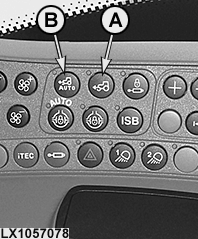
LX1057078-UN-27AUG13
On the Side Console
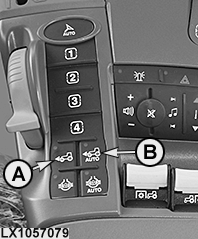
LX1057079-UN-22JAN14
On the Command ARM™
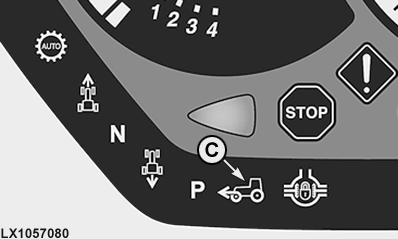
LX1057080-UN-16JUL13
A - Button for Switching Front-Wheel Drive On and Off Manually
B - Button for Switching Front-Wheel Drive On and Off Automatically
C - Indicator Light Comes On when Front-Wheel Drive is Engaged
Front-wheel drive, manual engagement and disengagement
Front-wheel drive can be engaged and disengaged at button (A) in all gears (forward and reverse), on-the-go and under load without using the clutch.
NOTE: Disengage front-wheel drive before driving at speeds above 23 km/h (14.3 mph) on public roads.
NOTE: Regardless of which front-wheel drive mode is selected, if travel speed is over 5 km/h (3.1 mph), front-wheel drive switches on automatically when the brakes are applied (provided both brake pedals are pressed) and remains on until the tractor has come to a standstill. The indicator light (C) on the instrument panel lights up.
The front-wheel drive mode selected previously becomes active again once braking has been completed.
NOTE: When driving at less than 5 km/h (3,1 mph) with front-wheel drive off, front-wheel drive does not come on when the brakes are applied.
Front-Wheel Drive, Automatic Engagement and Disengagement
The function for automatically switching the front-wheel drive on and off can be enabled and disabled using button (B). If the function is active, the indicator light of button (B) lights up and the front-wheel drive is automatically switched on or off depending on the driving situation.
NOTE: If the front-wheel drive activates due to the driving situation, indicator light (C) also lights up on the instrument panel.
The following driving situations cause front-wheel drive to switch on or off automatically:
|
Driving situation |
Front-wheel drive |
|---|---|
|
Travel speed below 19 km/h (11.8 mph) .............. |
ON |
|
Steering angle less than custom shut-off angle1.............. |
ON |
|
Travel speed is greater than 23 km/h (14.3 mph) .............. |
OFF |
|
Steering angle greater than custom shut-off angle1.............. |
OFF |
Activate and deactivate automatic mode of front-wheel drive via custom shut-off angle (if equipped)
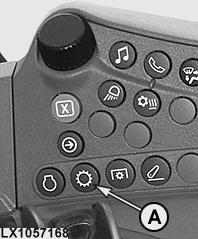
LX1057168-UN-22JAN14
Side Console
LX1057169-UN-22JAN14
CommandARM™
LX1057170-UN-28AUG13
AutoPowr™ Illustrated
LX1057172-UN-28AUG13
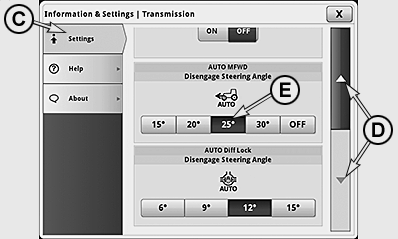
IMPORTANT: The maximum possible shut-off angle for the automatic engagement and disengagement of the front-wheel drive depends on the tire type, tread width, and steering stop and can be less than the angle that can be selected on the display.
As a result of tolerances in the set steering angle stop, is possible that the set shut-off angle for the automatic mode of the front-wheel drive is not reached on one or both of the steering sides. To ensure that shut-off occurs on both sides, the next smaller shut-off angle has to be selected in the display in this case.
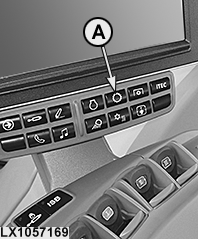
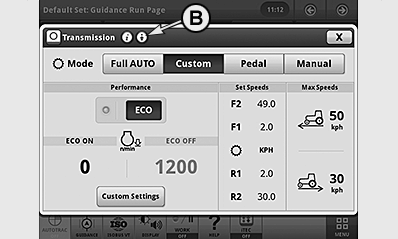
To change custom shut-off angle, press transmission button (A) and then icon (B) for advanced settings in the first line of the transmission page.
Select tab (C) and use arrow keys (D) to select the relevant input box. Select the desired shut-off angle (E). To save, close this page and close transmission page. Selecting OFF as the steering angle disables the automatic disengagement.
|
1 See custom settings
|
OULXA64,0002F03-19-20151130 |