Tractor Equipped With Front Suspension Option
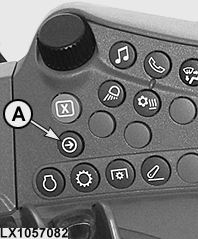
LX1057082-UN-22JAN14
Side Console
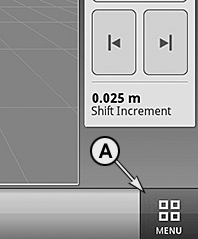
LX1057083-UN-01AUG13
CommandARM™
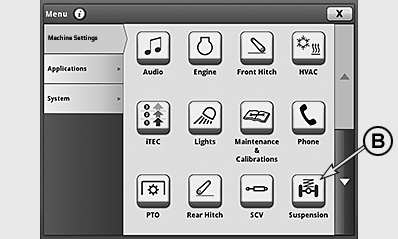
LX1057490-UN-05DEC14
Button for Suspension Systems Page
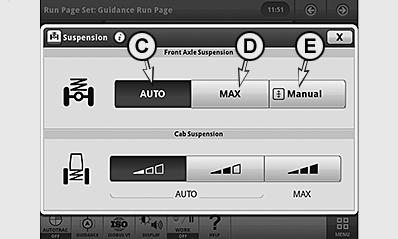
LX1057085-UN-17JUL13
Buttons for Front-Axle Suspension
A - Button for CommandCenter™ Menu
B - Button for Suspension Systems Page
C - Button for AUTO Operating Mode
D - Button for MAX Operating Mode
E - Button for Manual Operating Mode
 CAUTION: When the engine is started and when a different suspension
front axle setting is selected, the front axle may move briefly, even
if the tractor is stationary. Make sure everyone is clear of the area
of potential danger.
CAUTION: When the engine is started and when a different suspension
front axle setting is selected, the front axle may move briefly, even
if the tractor is stationary. Make sure everyone is clear of the area
of potential danger.
IMPORTANT: If faults occur in the regulating system, the yellow CAUTION light on the instrument panel lights up and a message appears at the CommandCenter™. In this case, operation of the suspension system is impaired or the system does not operate at all. Drive slowly so as not to inhibit safety or damage components. Consult your John Deere™ dealer immediately.
NOTE: The CommandCenter™ may be operated via the control panel or touchscreen (depending on equipment).
Actuate button (A) to access the CommandCenter™ menu. Actuate button (B) to access the suspension systems page. On the suspension systems page, three different axle suspension operating modes can be selected using buttons (C), (D) or (E).
NOTE: The active mode is displayed on a dark background.
AUTO operating mode (C)
If AUTO is selected, suspension reacts automatically in response to conditions. Travel speed, surface characteristics, tractor load and heavy implements at the rear are all taken into account. The best possible comfort is achieved. Level control of the axle is active at a travel speed of 0.5 km/h (0.3 mph) and above.
MAX operating mode (D)
If MAX is selected, suspension is set to maximum hardness (e.g. for operation with a front loader). Level control of the axle is active at a travel speed of 0.5 km/h (0.3 mph) and above; additionally there is a delay when starting up from the start: control does not become active until the tractor has moved 5 m (16 ft.). When the speed exceeds 35 km/h (22 mph), the hardness of the suspension is reduced below MAX to provide more comfort. When speed drops below 25 km/h (15 mph) again, the MAX setting is re-activated.
Manual operating mode (E)
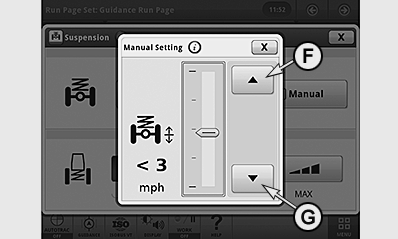
LX1057086-UN-17JUL13
F - Raise Front End of Tractor
G - Lower Front End of Tractor
NOTE: MAN appears on the display only as an icon.
If Manual is selected, the “Manual Settings” page is accessed and the axle settles in its mid-position. The tractor front part can now be raised or lowered manually by pressing the buttons (F) or (G) (e.g. to attach implements). The bar graph shows the current position. Close the page to exit.
The manual setting is overridden as soon as travel speed exceeds 5 km/h (3 mph). The system returns to its previous setting (AUTO or MAX).
|
OULXA64,0002F04-19-20151112 |