AutoTrac™ Steering System (if equipped)
RXA0109998-UN-20AUG10
LX1057426-UN-29JUL14
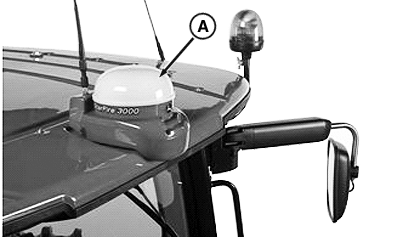
A - Position Receiver
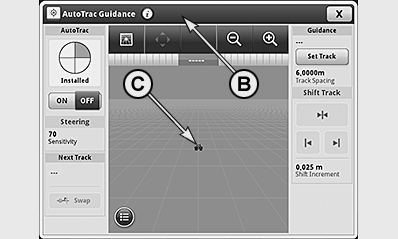
B - GreenStar display in the CommandCenter™
C - Marker
NOTE: Electro-hydraulic steering is required for AutoTrac™ to function. Refer to AutoTrac™ Operator's Manual for detailed instructions.
- The AutoTrac™ steering system uses the StarFire position receiver (A) and the GreenStar display (B) in the CommandCenter™ to support the operator during steering the tractor.
-
The operator has to enter the width of the implement minus the
desired track overlap into the GreenStar™ display.
The operator has to drive the track in a straight line in the first pass to enter the start and end points of the desired stretch. For further variations of the track guidance of the steering system, refer to the AutoTrac™ Operator’s Manual.
- To activate AutoTrac™, press the AutoTrac™ button on the CommandARM™ or on the side-console after GreenStar display has been enabled. Marker (C) represents the current position of the tractor on the display. By referring to the other information shown on the display, the operator can compare the current position of the tractor with the set track.
- AutoTrac™ is a straight-line guidance system. The operator can take control of the tractor at any time by actively turning the steering wheel. Travel speed is controlled exclusively by the operator, who used the brake or actuates the accelerator pedal or hand throttle. Operator has to turn the vehicle back at end of each pass and to go around any field obstacles.
NOTE: When using AutoTrac™, achievable travel speeds are 0.5 to 30 km/h (forward) and 0.5 to 10 km/h (reverse).
NOTE: If required, minimum speed may be reduced to 0.1 km/h. Contact your John-Deere™ dealer about this.
|
OULXA64,0002F0C-19-20140729 |