FieldCruise™, Using Cruise Control
LX1057073-UN-22JAN14
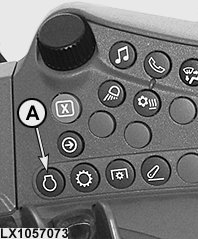
On the Side Console
LX1057074-UN-22JAN14
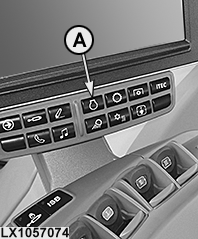
On the Command ARM™
LX1057090-UN-22JUL13
LX1057091-UN-22JUL13
LX1057129-UN-01AUG13
LX1057092-UN-14OCT13
A - Engine Button
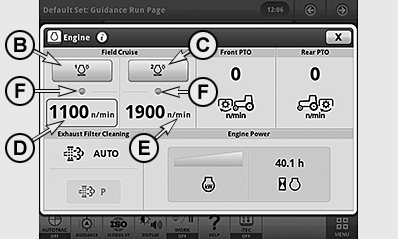
B - Button, FieldCruise™ 1 On/Off
C - Button, FieldCruise™ 2 On/Off
D - FieldCruise™ Speed 1 (Status, Activated)
E - FieldCruise™ Speed 2
F - FieldCruise™ Indicator Light, Speed Switched On
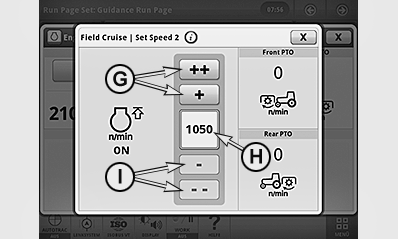
G - Button, Increase Speed
H - Speed Setting
I - Button, Reduce Speed
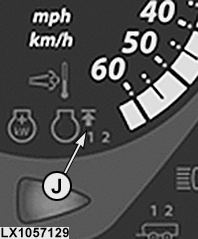
J - FieldCruise™ Indicator Light, 1 or 2
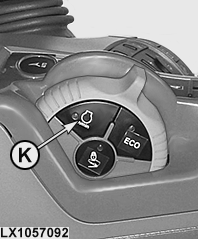
K - Button, FieldCruise™ ON/OFF, with CommandARM™ only
By means of the FieldCruise™ function, the engine speed can be limited to a range from 1050 to 2100 rpm. Changes to cruise control take effect immediately.
Using cruise control in light load situations may reduce fuel consumption.
FieldCruise™ can be employed for certain applications, for example for operating the power take-off when bales are pressed.
Two different FieldCruise™ speeds can be set, enabling the operator to toggle quickly from the one to the other.
Set FieldCruise™ speed
-
Press engine button (A).
-
Press button (D) or (E) and set the desired speed using button (G) or (I).
Switch FieldCruise™ on or off
-
Press engine button (A).
-
Press button (B) or (C) to switch FieldCruise™ 1 or FieldCruise™ 2 on or off.
NOTE: If FieldCruise™ has been activated, FieldCruise™ remains active when the engine is restarted.
When FieldCruise™ is switched on, indicator lights (F) and (J) light up together with the figures “1” or “2”. On the CommandARM™, the indicator light in button (K) also lights up.
Button (K) allows FieldCruise™ to be switched on and off directly (only with CommandARM™). When FieldCruise™ is switched off, the previously used speed is highlighted and automatically reselected whenever FieldCruise™ is switched on at button (K) on the CommandARM™.
|
OULXA64,0002F0F-19-20140731 |