Heating and Ventilation
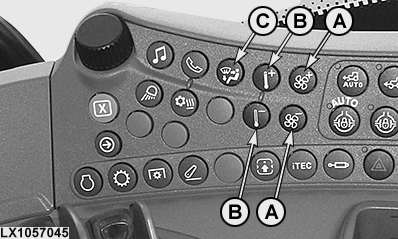
LX1057045-UN-22JAN14
Side Console
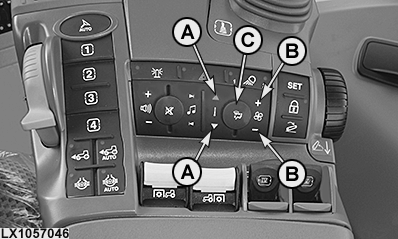
LX1057046-UN-22JAN14
CommandARM™

LX1057134-UN-01AUG13
A — Fan Control Indicator
LX1057135-UN-01AUG13
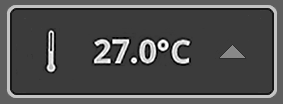
B — Temperature Setting Indicator
LX1057136-UN-01AUG13
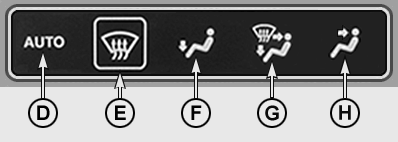
C — Air Flow Distribution Indicator
Each time buttons (A) to (C) are pressed the relevant display field is shown in the CommandCenter™.
(A) — Fan speed
Buttons (A) are used to set the desired fan speed directly.
In Auto mode, fan speed is adjusted automatically to meet the respective requirements.
(B) — Temperature control
Buttons (B) are used to set the desired temperature directly.
(C) — Air flow distribution
The operator can choose directly between the various air flow distribution modes by pressing button (C) several times.
• (D) — Automatic air flow distribution
• (E) — Deicing and removing humidity from windshield
• (F) — Air flow directed to the footwell
• (G) — Air flow distributed evenly throughout the operator's cab
• (H) — Air flow directed to the operator
Air flow distribution - description
• (D) — Automatic air flow distribution
LX1057136-UN-01AUG13
Air Flow Distribution Indicator
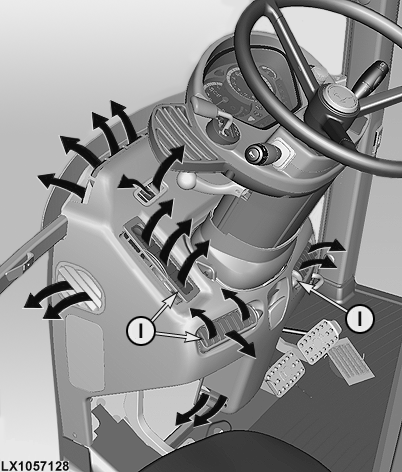
LX1057128-UN-01AUG13
D - Air Flow Distribution Mode - Automatic
E - Air Flow Distribution Mode - Windshield
F - Air Flow Distribution Mode - Operator
G - Air Flow Distribution Mode - Windows, Operator and Footwell
H - Air Flow Distribution Mode - Footwell
I - Air Louvers
Select air flow distribution mode (D) and set desired fan speed (A) and temperature (B). Air distribution is adjusted automatically to meet the requirements.
• (E) — Deicing and removing humidity from windshield
Select air distribution mode (E), then set heater (B) to maximum heating effect and fan (A) to maximum speed.
• (F) — Air flow directed to the footwell
Select air flow distribution mode (F) and set the desired fan speed (A) and temperature (B).
• (G) — Air flow distributed evenly throughout the operator's cab
Select air flow distribution mode (G) and set desired fan speed (A) and temperature (B).
• (H) — Air flow directed to the operator
Select air flow distribution mode (H) and set desired fan speed (A) and temperature (B). The direction and force of the air flow can be further adjusted at louvers (I).
|
OULXA64,0003008-19-20130802 |