PowrQuad™ PLUS Transmission — Settings
LX1057154-UN-22JAN14
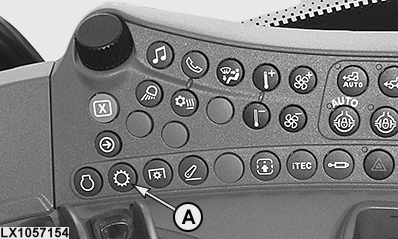
Transmission Button
LX1057513-UN-31JUL15
LX1057164-UN-22AUG13
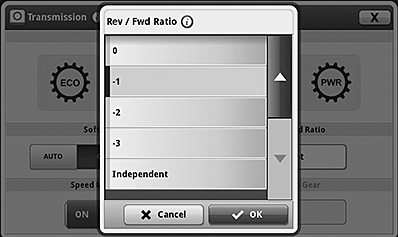
Set Reverse/Forward Gear Ratio
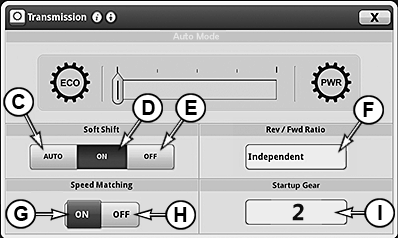
C / D / E — SoftShift when Changing Gears
If this option is activated, engine speed is matched temporarily by the electronics to achieve a smoother shift.
Press transmission button (A) and select the desired SoftShift setting:
- C — SoftShift switched on, but off when PTO is operating
- D — SoftShift switched on all the time
- E — SoftShift switched off all the time
F — Select reverse/forward gear ratio
This function allows a different travel speed to be selected automatically when direction of travel is changed. The speed ratio between forward and reverse travel can be set between +3 and -3.
Press transmission button (A) and access the menu for setting the reverse/forward gear ratio from display box (F). Set the desired ratio and save or discard the change.
The relationship remains in effect when AutoShift is switched off and is stored after ignition is switched off.
If Independent is selected, the electronic system will learn the forward and reverse gear manually selected by the operator and will shift into the relevant gear when the direction of travel is changed.
G / H — Speed Matching when Changing Range
If this option is activated, when changing ranges at travel speeds at or above approx. 7 km/h (4.4 mph), the transmission is automatically shifted into a gear that matches the travel speed. This automatic function can be overridden by pressing a gear shift switch during the change of range.
Press transmission button (A) and select speed matching ON (G) or OFF (H).
I — Gear at Start
The figure in display box (I) determines which gear will be automatically selected at the transmission immediately after the engine is started.
B / C — FieldCruise™, Set the Cruise Control
LX1057156-UN-22JAN14
LX1057157-UN-21AUG13
LX1057091-UN-22JUL13
LX1057161-UN-21AUG13
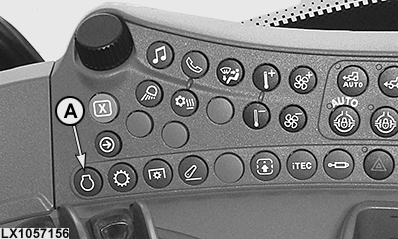
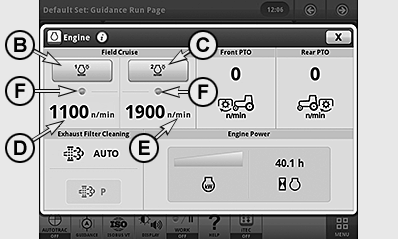
A - Engine Button
B - Button, FieldCruise™ 1 On/Off
C - Button, FieldCruise™ 2 On/Off
D - FieldCruise™ Speed 1 (Status, Activated)
E - FieldCruise™ Speed 2
F - FieldCruise™ Indicator Light, Speed Switched On
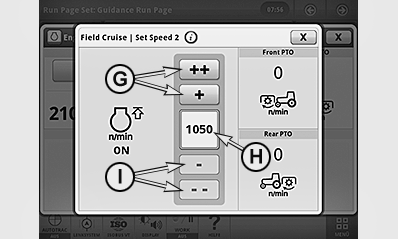
G - Button, Increase Speed
H - Speed Setting
I - Button, Reduce Speed
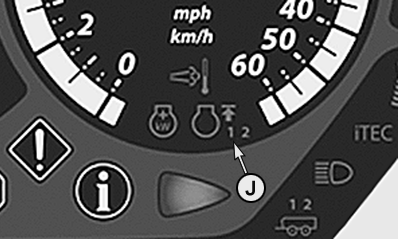
J - FieldCruise™ Indicator Light, 1 or 2
K - Button for FieldCruise™ On/Off, with CommandARM™ only
By means of the FieldCruise™ function, the engine speed can be limited to a range from 1050 to 2100 rpm. Changes to cruise control take effect immediately.
Using cruise control in light load situations may reduce fuel consumption.
FieldCruise™ may be used in some applications such as operating the PTO while baling.
Two different FieldCruise™ speeds can be set, enabling the operator to toggle quickly from the one to the other.
Set FieldCruise™ speeds
-
Press engine button (A).
-
Press button (D) or (E) and set the desired speed using button (G) or (I).
Switch FieldCruise™ on or off
-
Press engine button (A).
-
Press button (B) or (C) to switch FieldCruise™ 1 or FieldCruise™ 2 on or off.
NOTE: If FieldCruise™ has been activated, FieldCruise™ remains active when the engine is restarted.
When FieldCruise™ is switched on, indicator lights (F) and (J) light up together with the figures “1” or “2”.
|
OULXA64,000300E-19-20150731 |