Rear Hitch - Operation with CommandARM™
LX1057026-UN-08JUL13
LX1057319-UN-22JAN14
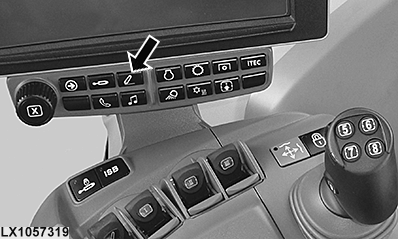
Button for Accessing the Rear Hitch Page
LX1056989-UN-24NOV14
Rear Hitch Page
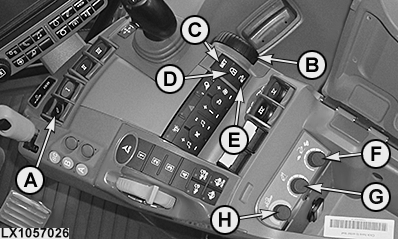
The following controls allow the operator to operate the following rear hitch functions directly, without having to access the rear hitch menu:
- A — Depth control lever (raise, lower, and float position of rear hitch)
- B — Control knob, depth control (raise and lower the rear hitch)
- C — SET button, saves the set operating depth
- D — Button, transport lock/hitch dampening
- E — Button, select saved operating depth / quick-lower
- F — Control knob, rate of drop
- G — Control knob, raise height limit
- H — Control knob, draft/depth control
IMPORTANT: Changes to hitch position are immediate.
- Use lever (A) or depth control knob (B) to lower the implement to the desired operating depth.
- Press SET button (C) to save the operating depth.
Set operating depth
- At the end of the field, pull depth control lever (A) backwards into the click position and release. The rear hitch is raised to the upper setting limit (P).
-
After turning, lower the rear hitch either by pushing lever
(A) forward to its click position or pressing and releasing button
(E). The rear hitch drops automatically to the position of the saved
operating depth (S) or to percentage (%) value (T).
If button (E) is held down for a long time, quick-lower is activated (see also Rear Hitch - Set Operating Depth in this section).
Turn around at end of field
NOTE: Setting an operating depth below the set operating depth functions only while the tractor is moving.
 CAUTION: To prevent injury and equipment damage, set the transport
lock/hitch dampening to ON before transporting.
CAUTION: To prevent injury and equipment damage, set the transport
lock/hitch dampening to ON before transporting.
Transport lock/hitch dampening
Transport lock/hitch dampening (D) is selected for transport or
operations where the rear hitch is not used. For more information,
see Rear Hitch - Use the Depth Control Lever in this section.
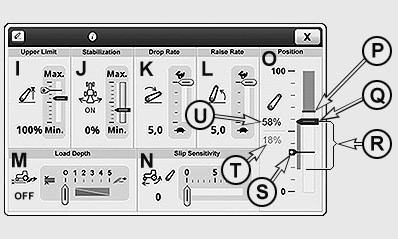
Hitch settings and functions in CommandCenter™
Press the button for accessing the hitch page. The following
functions are displayed on the hitch page:
- I — Raise height limit
- J — Lock height of stabilizer bar
- K — Rate of drop
- L — Raise rate
- M — Draft/Depth control
- N — Slip sensitivity
- O — Rear hitch position/status display
In position/status display (O), the following functions are represented:
- P — Currently set raise height limit
- Q — Current hitch position
- R — Remaining motion of hitch
- S — Saved operating depth
- T — % value of the desired operating depth
- U — Percentage (%) value of current hitch position
If a function is selected, a desired change can be set in the context menu. Changes take effect immediately. For more information, see the following pages.
Pressing SET (C) saves the current operating depth. If depth control lever (A) is in its float position when the SET button is pressed, 0% is saved as the operating depth. The saved operating depth (S) is represented by a narrow bar with an arrow on the left.
Current hitch position (Q) is also represented as a percentage (%) valve (U).
When the hitch is lowered fully, the percentage (%) value for hitch position is 0 %. When the hitch is raised fully, the percentage (%) value for hitch position is 100 %.
If lever (A) or depth control knob (B) is used to set the hitch to a new operating position, the remaining hitch motion (R) appears until the set operating height is reached.
|
OULXA64,000307D-19-20161012 |